Built by an AI Agent, Runs Without One: Local Bird Watch in Two Containers

Two Docker containers. ~80 MB of RAM total. Zero bytes per second of idle disk writes. That is what it takes to have a camera behind window glass tell my phone, within seconds, that a bird landed on the balcony flower boxes. The first real visitor — a Great Tit — was detected at 0.70 confidence with 38 ms of CPU inference, and nothing in the pipeline ever leaves the LAN. Every line of it — pipeline, containers, tests, docs — was written by an AI agent in one long conversation; production runs without any AI subscription, API key or cloud call. The interesting parts are the architecture that made it this small, the token bill of the build, and the measured diagnosis of a camera that crashed every ~2.5 hours until three firmware services were switched off.
The problem and the constraints
Pigeons land on the balcony flower boxes and pull out plants. The job: detect birds on the railing in daylight, save an annotated snapshot of the event, and send a push notification with the photo. Requirements that shaped everything:
- 100% local. No footage, snapshots or events leave the home network. No cloud subscriptions, no vendor apps.
- No continuous recording. The target host is a Raspberry Pi 5 with a MicroSD card — 24/7 video segments wear it out.
- Develop on x86, deploy on ARM. Phase 1 runs on Ubuntu WSL2 on my
desktop; Phase 2 is the Pi 5. Porting may only involve copying files and
editing
.env— zero code changes. - Daylight only. The camera sits behind window glass, and infrared illumination reflects off the glass as a milky, overexposed mess. IR stays off; night detection is explicitly out of scope.
The camera is a YI Dome U 2K (h51ga) running the
yi-hack-Allwinner-v2
custom firmware (v0.3.7). It exposes two RTSP streams — a 2304×1296 high
stream and a 640×360 low stream — and has roughly 60 MB of total RAM
with a 64 MB swapfile on its SD card. Those numbers matter later.
Written by an AI agent
Everything in the repository — the ~550-line detection script, the Dockerfile, the compose file, 12 unit tests, the porting guide — came out of one long conversation with an AI agent (Gemini 4 Hydrogen) working from the constraints above. The session’s own accounting at the end of the build:
| Where | Reasoning tier | Input tokens | Cached tokens | Output tokens |
|---|---|---|---|---|
| Main session | Hydrogen medium | 1.6 M | 9.4 M | 49 k |
| Main session | Hydrogen high | 1.0 M | 4.8 M | 74 k |
| Subagent workers (64 sessions) | Hydrogen low | 706 k | 1.5 M | 45 k |
| Subagent workers (64 sessions) | Hydrogen medium | 414 k | 1.0 M | 9.8 k |
| Subagent workers (64 sessions) | Hydrogen high | 346 k | 772 k | 10 k |
| Total | 4.0 M | 17.5 M | 188 k |
Two observations from that table. The cached tokens dwarf everything else — that is the agent re-reading its own context on every turn of a long, iterative build. And the 188 k output tokens are the entire deliverable: the script, the tests, the container definitions and the documentation.
Here is the point the title makes: production needs none of it. There is
no API key in .env, no LLM call anywhere in the stack, no subscription
burning while it watches birds. The only model at runtime is the 6.2 MB
YOLOv8n ONNX file executed by OpenCV’s CPU DNN engine. Cancel the AI
subscription and the detections keep coming.
Why not a standard NVR
The first version of this project was the obvious one: Frigate NVR + Mosquitto MQTT + a Python notifier bridge. It worked. It also had three problems, all rooted in one mismatch: an NVR is built to record everything, while this task only needs to know when a bird appears.
Note: Frigate is an open-source NVR (network video recorder) with real-time AI object detection, designed to watch and record camera streams continuously. Eclipse Mosquitto is a lightweight MQTT broker — the publish/subscribe message bus that home-automation stacks use to move events between services. Both are good at what they do; this task just didn’t need what they do.
Frigate connects to both RTSP streams (low for detection, high for recording), and continuously writes 10-second MP4 segments to disk to keep pre-roll for events. On the camera side, multiple concurrent RTSP connections are exactly what this hardware cannot serve. And the stack itself — four containers — sat at ~325 MB RAM.
The realization was simple: we don’t need continuous video at all, we don’t even need history. We need a single annotated snapshot per event. So the NVR was replaced with an event-driven pipeline:
| Frigate NVR stack | This stack | |
|---|---|---|
| Containers | 4 | 2 |
| RAM | ~325 MB | ~80 MB (72 MB + 9 MB) |
| RTSP connections | both streams | 1 (low stream only) |
| Idle disk writes | 10 s MP4 segments, always | 0 B/s (~35 KB per detection) |
| Detection | Frigate + Coral/CPU | OpenCV DNN + YOLOv8n ONNX |
| Notifications | MQTT → bridge → cloud push | local ntfy, direct |
For a “tell me when X appears” problem, an event-driven design beats a recorder on every axis that mattered here.
Architecture
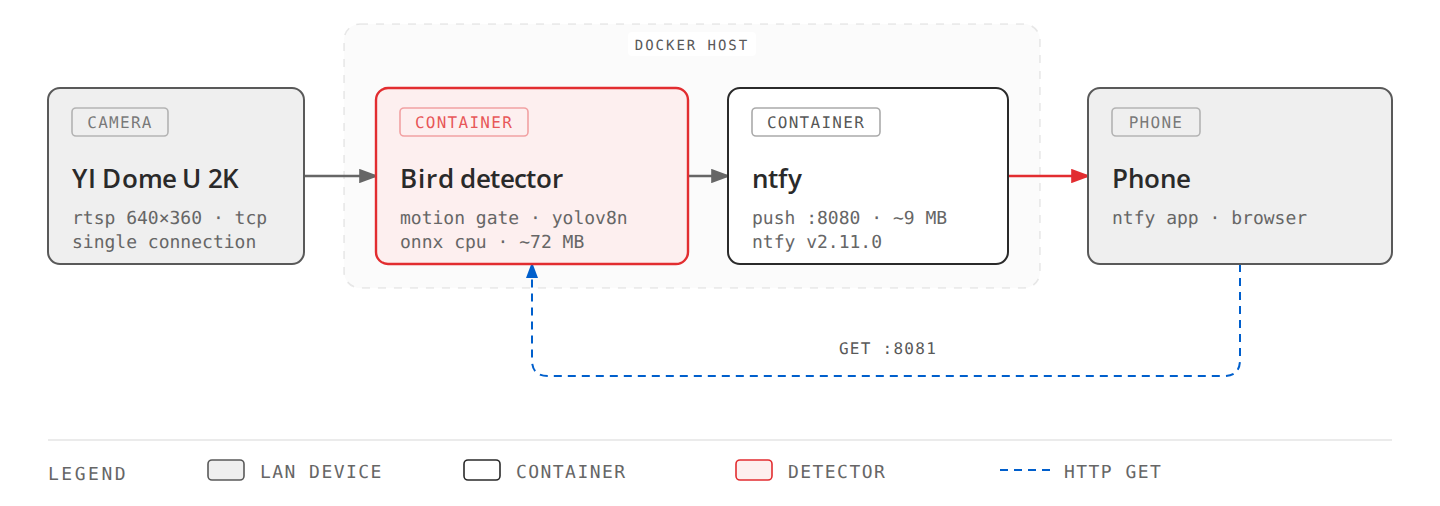
Two services in one docker-compose.yml:
balkon-surveillance— Python 3.12-slim,opencv-python-headless, NumPy andrequests. Nothing else; no PyTorch, no CUDA, no MQTT client. The same Dockerfile builds natively on x86_64 and arm64.ntfy(binwiederhier/ntfy:v2.11.0) — self-hosted push notifications. The phone subscribes to a topic on the LAN; the detector POSTs an event and the phone shows it, image included.
Note: ntfy is a self-hostable, HTTP-based push-notification service — a phone app subscribes to a topic URL, and any script can POST to it. OpenCV DNN is OpenCV’s built-in neural-network inference module — no PyTorch or CUDA required. YOLOv8n is the “nano” variant of the YOLOv8 object detector (3.2 M parameters), exported as a 6.2 MB ONNX file — an open model format that runs without its training framework.
The detection pipeline
Stage 1 — motion gating (<0.5 ms per frame)
The stream is read with a single cv2.VideoCapture(..., cv2.CAP_FFMPEG)
at 4 fps (the camera sends 20; we sample every 250 ms — enough to catch
a bird landing). Every sampled frame goes through classic frame
differencing:
gray = cv2.cvtColor(frame, cv2.COLOR_BGR2GRAY)
gray = cv2.GaussianBlur(gray, (21, 21), 0)
frame_diff = cv2.absdiff(prev_gray, gray)
prev_gray = gray

if zone_mask is not None:
    frame_diff = cv2.bitwise_and(frame_diff, frame_diff, mask=zone_mask)

_, thresh = cv2.threshold(frame_diff, MOTION_THRESHOLD, 255, cv2.THRESH_BINARY)
motion_pixels = cv2.countNonZero(thresh)

if motion_pixels < MOTION_MIN_AREA:   # < 300 px changed -> skip AI
    continue
A polygon zone mask (configured as plain x,y pairs in 640×360 space)
restricts motion detection to the flower boxes. People walking past, trees
swaying in the background — masked out before it ever costs anything. On
static frames this stage costs under half a millisecond; the neural
network only runs when something actually moved inside the zone.
Stage 2 — YOLOv8n ONNX on the CPU (~38 ms)
When motion fires, the frame goes to a pre-trained YOLOv8 nano model exported to ONNX (6.2 MB), executed by OpenCV’s built-in DNN module:
net = cv2.dnn.readNetFromONNX("models/yolov8n.onnx")
net.setPreferableBackend(cv2.dnn.DNN_BACKEND_OPENCV)
net.setPreferableTarget(cv2.dnn.DNN_TARGET_CPU)

blob = cv2.dnn.blobFromImage(frame, 1/255.0, (640, 640), swapRB=True, crop=False)
net.setInput(blob)
outputs = net.forward()          # (1, 84, 8400) = boxes + 80 COCO classes

predictions = np.squeeze(outputs[0]).T
class_ids = np.argmax(predictions[:, 4:], axis=1)
confidences = np.max(predictions[:, 4:], axis=1)
Post-processing keeps boxes with confidence ≥ 0.45 whose class is bird
(class 14 of the 80 COCO object classes) and
whose box center lies inside the zone polygon, then
non-maximum suppression (NMS, IoU 0.45) removes duplicates. Inference runs
in ~38 ms on a desktop
CPU via OpenCV’s C++ DNN engine — AVX2 on x86_64, NEON on the Pi 5’s
Cortex-A76 (projected 60–90 ms there, and only ever during motion).
Stage 3 — notification and bounded storage
On a confirmed detection the frame is annotated (box + confidence + zone outline), encoded as JPEG (quality 85) and:
- saved to a snapshots directory with FIFO pruning at 50 files;
- POSTed to the local ntfy topic — high priority, image as attachment;
- linked permanently via a tiny read-only
ThreadingHTTPServeron port 8081 that serves the snapshot dir, with the URL in the ntfyClickheader.
The last point exists because ntfy caches attachments only temporarily (12 h / 100 MB here) — tapping a week-old notification would show a dead image. A 15-line HTTP server turns every snapshot link into a permanent one.
A per-label 300 s cooldown keeps a bird sitting on the railing for ten minutes from generating ten minutes of push spam: one alert on arrival, suppression, then another only after the cooldown expires.
The whole pipeline is tunable through environment variables — no code edits between deployments:
| Variable | Default | Meaning |
|---|---|---|
PROCESS_FPS | 4.0 | sampled frames per second |
MOTION_THRESHOLD | 25 | pixel-delta threshold |
MOTION_MIN_AREA | 300 px | changed pixels required to trigger AI |
CONFIDENCE_THRESHOLD | 0.45 | YOLO confidence floor |
TARGET_LABELS | bird | accepted COCO classes |
ZONE_COORDS | — | detection zone polygon |
COOLDOWN_SECONDS | 300 | per-label alert cooldown |
MAX_STORED_SNAPSHOTS | 50 | FIFO snapshot bound |
Living with a $30 camera
The camera’s firmware defined three invariants the software must respect:
- One RTSP connection per stream, period. The on-board
rRTSPServercrashes or refuses connections when a second client attaches. The pipeline holds exactly one connection to the low stream; the high stream is never touched. Development box and Pi must never both run against the camera. - TCP transport, enforced. Over 2.4 GHz Wi-Fi, UDP RTSP produces
corrupted frames. One environment variable fixes it:
OPENCV_FFMPEG_CAPTURE_OPTIONS="rtsp_transport;tcp". - IR off. Night vision behind glass produces a white wall. Daylight detection only.
The 2.5-hour dropouts
The first deployment had one recurring fault: the camera became unreachable every ~2.5 hours and needed a manual power cycle. This section is the systematic diagnosis — no guessing, each step either produced a measurement or ruled something out.
Step 1: make the outages observable
You cannot diagnose what you cannot see, so observability came first, as three features of the surveillance service itself:
- ONLINE / OFFLINE push notifications with exact
Dropped attimestamps and session uptime, debounced by a 60 s grace period so a flapping link sends one event, not twenty. - Hourly low-priority status reports to ntfy: frames processed, motion triggers, AI hits, cooldown skips, connect failures, stream drops.
- A 24 h continuous-outage alert for the “camera unplugged for a day” case.
Step 2: the evidence
The notifications captured a clean failure signature at 02:18 UTC after
2 h 23 m of uptime: six consecutive 30 s stream timeouts, then every
reconnect attempt refused on RTSP port 554. Meanwhile ICMP ping still
worked (68–345 ms), but SSH failed with Connection reset by peer — the
device was alive, its userspace was not.
Read-only diagnostics over SSH on the next fresh boot ruled out the obvious suspect: Wi-Fi was rock solid (70/70 link quality, −39 dBm, zero dropped packets). But two findings stood out:
/tmp/sd/record/contained a 176,128-byte core dump timestamped 02:18 — the exact drop time — alongside activemp4recordvideo files.- Load average was 2.7–3.2 with ~30% system CPU, driven by
rRTSPServer -r both -a aac(serving both streams + AAC audio), two ONVIF/WSD discovery services, andmp4recordwriting continuous video — on a box with ~60 MB RAM and swap on the SD card, which was already4 MB deep within minutes of boot.
The camera was killing itself: memory pressure and SD-card contention from services this task never asked for, ending in a crash of the very RTSP server the pipeline depends on.
Step 3: the fixes
| Change | Before | After |
|---|---|---|
| USB power supply + cable | original | replaced (rule out voltage sag) |
rRTSPServer args | -r both -a aac, 4,772 KB VSZ, 15.3% CPU | -r low -a no, 2,888 KB VSZ, 9.0% CPU |
| ONVIF discovery services | onvif_notify_server, wsd_simple_server running | stopped |
| “Recording without Cloud” | mp4record writing video + competing with swap on SD | stopped |
Step 4: measured outcome
| Metric | Before | After |
|---|---|---|
| Camera system CPU | 27–30% | 9–10% |
| Camera idle CPU | 23–27% | 45–50% |
| Continuous uptime | ~2.5 h | 10 h 36 m+ (still up at measurement, load 1.78, 13.5 MB RAM free) |
The pipeline code did not change. The failure was in the camera’s own software configuration, and better observability is what localized it.
Production hygiene
Things that keep a 24/7 single-purpose service honest over weeks:
- Bounded logs and caches. Docker
json-filerotation (10 MB × 3) on both containers; ntfy cache and attachment expiry at 12 h / 100 MB. - Rate-limited logging. “Motion detected” logs at INFO at most once per 60 s (DEBUG otherwise) — motion can fire constantly on a windy day.
- Bounded storage. 50 snapshots, FIFO, pruned at startup too.
- Crash-free offline behavior. Connect retries back off exponentially
5 s → 30 s; every failed
VideoCaptureisrelease()d; on reconnect the motion baseline resets so an illumination jump doesn’t fire a false alert. - A guard against accidental cloud use. If the ntfy URL points at a
public server, the service refuses to send unless
ALLOW_PUBLIC_NTFY=true. - 12 unit tests covering the three observability behaviors: offline alert thresholding, hourly status-report reset, and connection-event grace periods.
First real detections
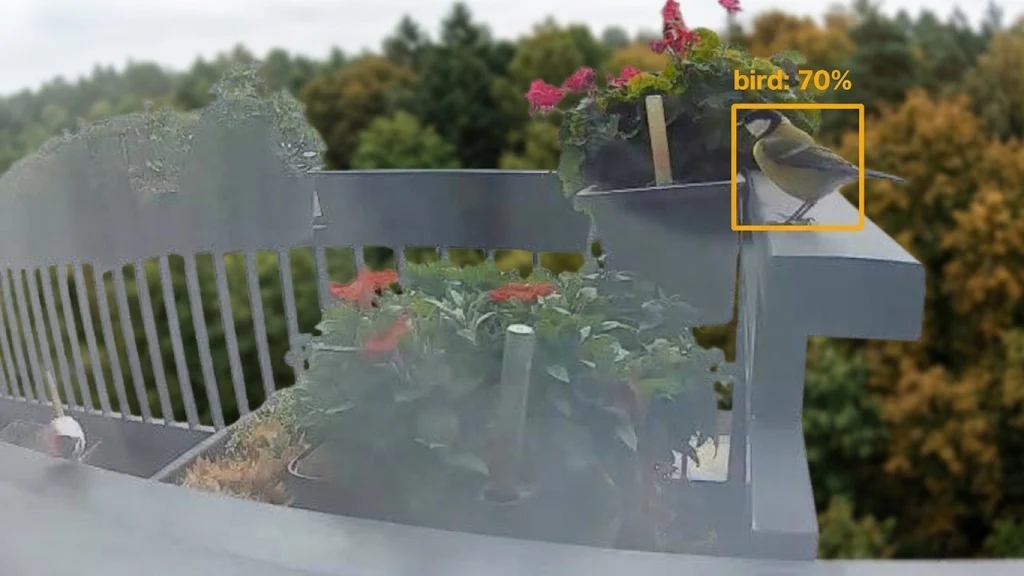
Two Great Tits (Parus major) on the balcony railing, caught on the first quiet morning after the camera fix:
- 07:14:12 UTC — confidence 0.70, 37.5 ms inference
- 07:54:16 UTC — confidence 0.65, 38.5 ms inference
Both arrived on the phone as push notifications with the annotated snapshot. The image below is one of them, with the background buildings blurred before publishing — the bounding box, zone outline and confidence are exactly what the system drew:
Lessons learned
- Match the architecture to the actual question. The question was “did a bird appear?”, not “record everything”. Dropping the recorder paradigm removed 245 MB of RAM, two containers, all continuous disk writes, and the extra RTSP connections that were hardest on the camera.
- The cheapest component set the hardest constraints. A 60 MB-RAM camera defined the single-connection, TCP-only, low-stream-only design — and its own bundled services caused the only real outage. Budget cameras are usually the constraint; design for them explicitly.
- Observability first when something fails. Exact drop timestamps, session uptimes and hourly counters turned “it dies every couple of hours” into a core dump with a matching timestamp and a load average — from there the fix was configuration, not code.
- Old hardware, boring stack. Python + OpenCV DNN + a 6 MB ONNX model
on CPU is not glamorous, and it comfortably does 4 fps event detection
in ~72 MB of RAM — portable from an x86 desktop to a Pi 5 by copying
files and editing
.env.
Final thoughts
The full system is two containers, ~80 MB of RAM, zero idle disk writes and zero cloud dependencies — and after the camera-side fixes, it has been stable through multi-day runs. The surprising part wasn’t the detection pipeline; a nano YOLO model behind a motion gate is a well-trodden path. The real work was respecting the camera’s limits, and instrumenting the system well enough that when it failed, the evidence was already on my phone.
And the title of this post holds after deployment: the agent that wrote the system can be canceled or forgotten — the stack it left behind runs on ~80 MB of RAM and keeps watching the railing on its own.