LLM-First Docs: Karpathy's Idea Meets TOGAF and OKF

We killed our Confluence wiki and rewrote the corporate Application Integration Architecture as markdown files — one entity per file, YAML frontmatter, relative links — that an LLM can traverse like a graph. The blueprint borrows structure from TOGAF, the file format from Google’s Open Knowledge Format, and the authoring philosophy from a single Andrej Karpathy gist.
The two extremes
Enterprise Architecture (EA) documentation usually lands in one of two failure modes:
| Extreme | Symptom |
|---|---|
| The Wiki Wasteland | Unstructured, wordy Confluence pages that rot within a quarter, are impossible to search, and cannot be parsed by automated tools. |
| The Heavy CASE Tool | Sophisticated ArchiMate / TOGAF repositories that need a specialist to operate, have high friction, and are unreadable to developers — let alone to AI coding assistants. |
Neither serves the audience that actually consumes architecture today: a developer’s AI agent, pulling context into a prompt. We needed a third option that is structured enough to be machine-parseable and cheap enough to be human-edited.
The Karpathy Lens — write docs for the model first
The whole approach rests on one idea, which Andrej Karpathy sketched in a gist: write documentation for the LLM first, because the LLM is the one that will summarise it for the human. That inverts the usual authoring priorities:
- Density over prose. Tables, lists, and explicit relations beat narrative paragraphs. A model can read a 12-row join table in one glance; a human would skim it.
- Structure over layout. Frontmatter keys, predictable headings, and relative links are the API the model calls against. Whitespace and styling are secondary.
- Context-efficiency over completeness. Every token competes for context window. Cut anything the model can derive.
Once you accept that the model is the primary reader, the rest of the design falls out naturally. TOGAF tells you what entities to model, OKF tells you how to serialise each one, and the Karpathy lens tells you how to write the body. The three compose; they don’t compete.
The three pillars
| Pillar | Role | Source |
|---|---|---|
| TOGAF metamodel | What entities exist and how they layer | TOGAF architecture domains |
| OKF (Open Knowledge Format) | How each entity is serialised to disk | Google Cloud post · SPEC.md |
| LLM-first formatting | How the body of each file is written | Karpathy gist |
Pillar A — TOGAF boundaries
We borrowed the TOGAF Content Metamodel domain split to organise the catalog into four layers:
- Business Architecture →
teams/(ownership boundaries) - Application Architecture →
systems/(internal apps vs. third-party SaaS) - Data Architecture →
objects/(schemas, record types, joins) - Technology & Integration →
api/andprocesses/(replication pipelines)
TOGAF also gives us the internal-vs-external distinction. Company-managed
systems live directly under systems/; third-party SaaS is isolated under
systems/external/. That single nesting rule maps the framework’s “internal
application components vs. external application services” onto a filesystem
path.
Pillar B — OKF serialisation
Google’s Open Knowledge Format gives us the on-disk shape:
- Every entity is one
.mdfile. - Every file opens with a strict YAML frontmatter block declaring its metadata.
- The body is standard markdown describing the concept.
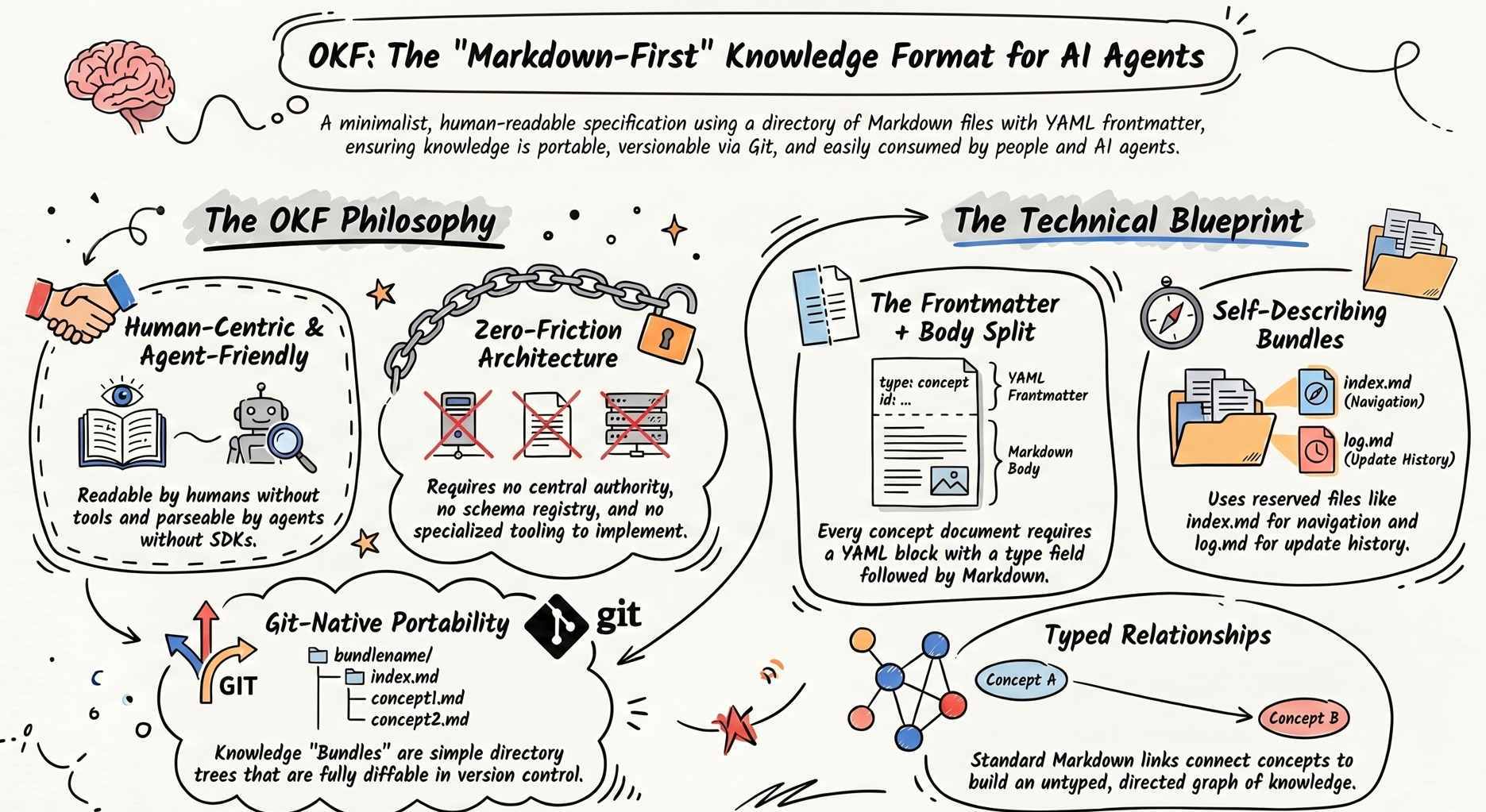
The OKF spec
fixes the vocabulary of frontmatter keys (type, title, description,
owner_team, timestamp, …), so a consumer — human or model — always knows
where to look. Below is a representative file (object names and timestamps
rotated; structure is real):
---
type: Business Object
title: CRM Subscription Asset
description: Subscription-shaped asset lines, backed by the Asset object
  (Record Type: Subscription).
owner_team: teams/billing
sobject_type: Standard Object
api_name: Asset
record_types: [Subscription]
resource: crm/src/objects/Asset.object
tags: [crm, subscription, asset]
timestamp: 2026-06-24T15:23:00Z
---
Pillar C — LLM-first body
With the file format fixed, the body is written under the Karpathy constraint: dense, structured, machine-traversable. The two patterns that earn their keep:
- Explicit joins and cardinality as text, instead of diagrams a model
cannot parse:
Join Condition: Asset.AccountId -> Account.Id Cardinality: N:1 - Relative links everywhere, so the model can hop from one file to the next
without leaving the prompt:
Belongs to a [Customer Account](account_customer.md).
Sourced from a [Recurring Order](order_recurring.md).
That last point is the punchline. A directory of OKF files with relative links is a graph — and graphs are exactly the shape an LLM agent wants to walk when it gathers context.
Writing for the model first does not abandon the human reader. The same flat markdown renders, unchanged, into a searchable HTML site: static-site generators like MkDocs Material consume the folder as-is, resolve the relative links into hyperlinks, and add full-text search and a sidebar nav on top. One source of truth — the agent reads the files, the human reads the rendered site. No separate “pretty version” to keep in sync.
The pipeline
The catalog is not hand-typed. An agentic pipeline reads source code and metadata, aligns it against the TOGAF/OKF schema, and writes the markdown:
┌───────────────────────┐      ┌─────────────────────────┐      ┌──────────────────────────┐
│ Source code & metadata│      │  Agentic pipeline       │      │  LLM-optimised catalog   │
│  • CRM objects & code │ ───▶│  1. read code/metadata  │ ───▶ │  • OKF markdown files    │
│  • Downstream systems │      │  2. apply TOGAF + OKF   │      │  • validate.py (linter)  │
│  • Integration flows  │      │  3. write .md + YAML    │      │  • relative-link graph   │
└───────────────────────┘      └─────────────────────────┘      └──────────────────────────┘
                                          ▲                                  │
                                          └────────── lint & validate ───────┘
                                                       (CI gate)
The linter is what turns “a folder of notes” into “architecture with a build step” — more on that below.
The folder tree
Nesting depth is held strictly constant so that relative links
(../../../conventions.md) resolve the same way from any file:
architecture-knowledge/
├── conventions.md        # Frontmatter schema & rules
├── log.md                # Root architecture changelog
├── index.md              # Main catalog index
├── teams/                # Business Architecture          (depth 1)
│   ├── billing.md
│   ├── platform.md
│   └── erp.md
└── systems/              # Application Architecture        (depth 1/2)
    ├── integrator/       # Boomi-style integration system
    ├── nexus/            # Internal "next-gen" system
    ├── ledger/           # ERP system
    ├── legacy-delivery/  # Legacy delivery system
    ├── crm/              # Salesforce CRM
    │   ├── log.md
    │   ├── index.md
    │   └── objects/      # Data Architecture               (depth 3)
    │       ├── account_customer.md
    │       ├── account_partner.md
    │       ├── asset_component.md
    │       ├── asset_seat.md
    │       ├── asset_subscription.md
    │       ├── contact.md
    │       ├── index.md
    │       ├── invoice.md
    │       ├── order.md
    │       ├── product.md
    │       └── quote.md
    └── external/         # Externally-managed SaaS         (depth 2)
        └── outreach/     # Third-party outreach tool       (depth 3)
Internal system codenames (nexus, ledger, legacy-delivery) are
placeholders — replace them with your own. The point is the shape: every
company-managed system sits one level shallower than every third-party one, and
every system owns its own objects/ subtree.
Anatomy of a file
Pick any file from the tree and it reads the same way: frontmatter declares
what it is, body declares how it relates. A scrubbed-but-real example,
asset_subscription.md:
---
type: Business Object
title: CRM Subscription Asset
description: Subscription-shaped asset lines, backed by the Asset object
  (Record Type: Subscription).
owner_team: teams/billing
sobject_type: Standard Object
api_name: Asset
record_types: [Subscription]
resource: crm/src/objects/Asset.object
tags: [crm, subscription, asset]
timestamp: 2026-06-24T15:23:00Z
---

# CRM Subscription Asset

Subscription-shaped lines on the standard `Asset` object, identified by
`RecordType = Subscription`. Replaces the legacy `LegacySubscription` custom
object (deprecated, see `subscription_legacy.md`).

## Relationships

| Direction | Target | Join | Cardinality |
|---|---|---|---|
| belongs to | [Customer Account](account_customer.md) | `Asset.AccountId -> Account.Id` | N:1 |
| sourced from | [Recurring Order](order.md) | `Asset.OrderId -> Order.Id` | N:1 |
| contains | [Seat Asset](asset_seat.md) | `Asset.ParentAssetId -> Asset.Id` | 1:N |

## Record types on this object

| Type | File |
|---|---|
| Subscription | this file |
| Seat | [asset_seat.md](asset_seat.md) |
| Component | [asset_component.md](asset_component.md) |
Three things to notice, all in service of the Karpathy lens:
- The frontmatter is the API — a model can extract type, owner, and provenance without reading the body.
- The relationship table is a join spec, not prose. A model can re-emit this as SQL or as a typed struct without further interpretation.
- Every relative link is walkable. The agent pulls this file, sees
[Customer Account](account_customer.md), and can fetch the next node on demand. The catalog behaves like a filesystem-backed knowledge graph.
The agentic co-author story
The catalog was built with an agent, not handed to one after the fact. The
moment that sold the approach was a metadata discrepancy in the CRM Asset
object.
The story, abbreviated:
The missing record types
- The
Asset.objectmetadata XML in the repo declared only two record types:OfferingandProduct. - The integration Apex, however, branched heavily on three behaviours the
metadata did not list:
Seat,Subscription, andComponent. - The live org config had them; the checked-in metadata did not.
A human reviewer would have flagged this as “stale metadata” and moved on. The
agent did something more useful: it treated the three behaviours as
first-class architectural entities and split them into three sibling files
— asset_seat.md, asset_subscription.md, asset_component.md — grouped
under a shared asset_* prefix. That gave each business model its own
addressable node in the graph, and surfaced the
legacy-subscription-vs-Asset-subscriptions distinction as a real link
rather than a buried comment.
The lesson is not “the agent was smart”. It is that an OKF file is cheap enough to author that the right granularity becomes affordable. Splitting one wandering Confluence page into three would never have happened by hand. Splitting three markdown files took the agent under a minute.
validate.py — architecture CI/CD
Free-form documentation rots. We pinned ours with a small Python linter that runs on every edit, locally and in CI:
# validate.py — abbreviated
import sys, pathlib, yaml, re

REQUIRED_KEYS = {"type", "title", "description", "owner_team", "timestamp"}
LINK_RE       = re.compile(r'\[([^\]]+)\]\(([^)]+)\)')
ROOT          = pathlib.Path("architecture-knowledge")

errors = []
for md in ROOT.rglob("*.md"):
    text = md.read_text()
    # 1. frontmatter keys
    meta = yaml.safe_load(text.split("---")[1])
    missing = REQUIRED_KEYS - meta.keys()
    if missing:
        errors.append(f"{md}: missing {missing}")
    # 2. every relative link must resolve
    for _, href in LINK_RE.findall(text):
        if href.startswith(("http", "#")):
            continue
        target = (md.parent / href.split("#")[0]).resolve()
        if not target.exists():
            errors.append(f"{md}: broken link -> {href}")

if errors:
    print("\n".join(errors))
    sys.exit(1)
Two checks, on purpose:
- Frontmatter completeness — every file carries the contract.
- Link integrity — every relative link points at a real file.
If either fails, the script exits 1. Treat a broken architecture link the
same way you treat a failing unit test: the build is red. Rename a file,
forget a redirect, and CI catches it before the catalog lies to a reader —
human or model.
Final thoughts
The catalog that came out of this is not impressive because it is large. It is impressive because it is boring: every file looks the same, every link resolves, every edit is linted, and every entity has exactly one home. That boringness is the feature. It is what lets a developer’s AI agent pull a coherent slice of the architecture into a prompt in seconds, and what lets a new engineer read the same files without a glossary.
TOGAF supplied the ontology, OKF supplied the file format, and the Karpathy gist supplied the editorial discipline. The combination is greater than any one of them: a self-validating, graph-walkable enterprise catalog that treats the LLM as a first-class reader. The dream of a self-documenting enterprise turns out to be reachable — one markdown file at a time.