ESP32 WiFi Voltmeter: HTTPS, WebSocket, and Browser GPS Without an App
No app install. No Play Store. No pairing. Open your phone’s browser, accept a certificate warning, and see live voltage readings with GPS coordinates — pushed over an encrypted WebSocket every 400ms. The path from Bluetooth to this point took 5 iterations, one afternoon, and an AI coding agent that tested every change on real hardware.

The starting point was a project we’d already blogged about: ESP32 BLE Voltage Monitor: End-to-End in 6 Hours. An ESP32 reads voltage via an ADS1115 ADC, broadcasts it over BLE, and a custom Android app displays it. It worked — but BLE has limitations:
- You need a custom Android app — high maintenance, users must install an APK
- BLE range is ~10m
- No web interface — you can’t just open a browser
- No GPS — you need a native app for location
The goal: open a phone browser, see voltage + GPS. No app install needed.
The migration was done using an AI coding agent (GLM-5.1 via OpenCode) running in WSL2 on Windows 11. The agent had full access to the existing codebase, serial monitor, build and flash tools, and USB passthrough to the ESP32. It proposed plans, got approval, executed, tested on real hardware, and iterated — 5 major iterations, each one tested with the ESP32 on the desk and a phone in hand.
For hobby projects like this, OpenCode Go is what I’d recommend — $10/month with generous limits on GLM-5.1 and other capable models.
Architecture
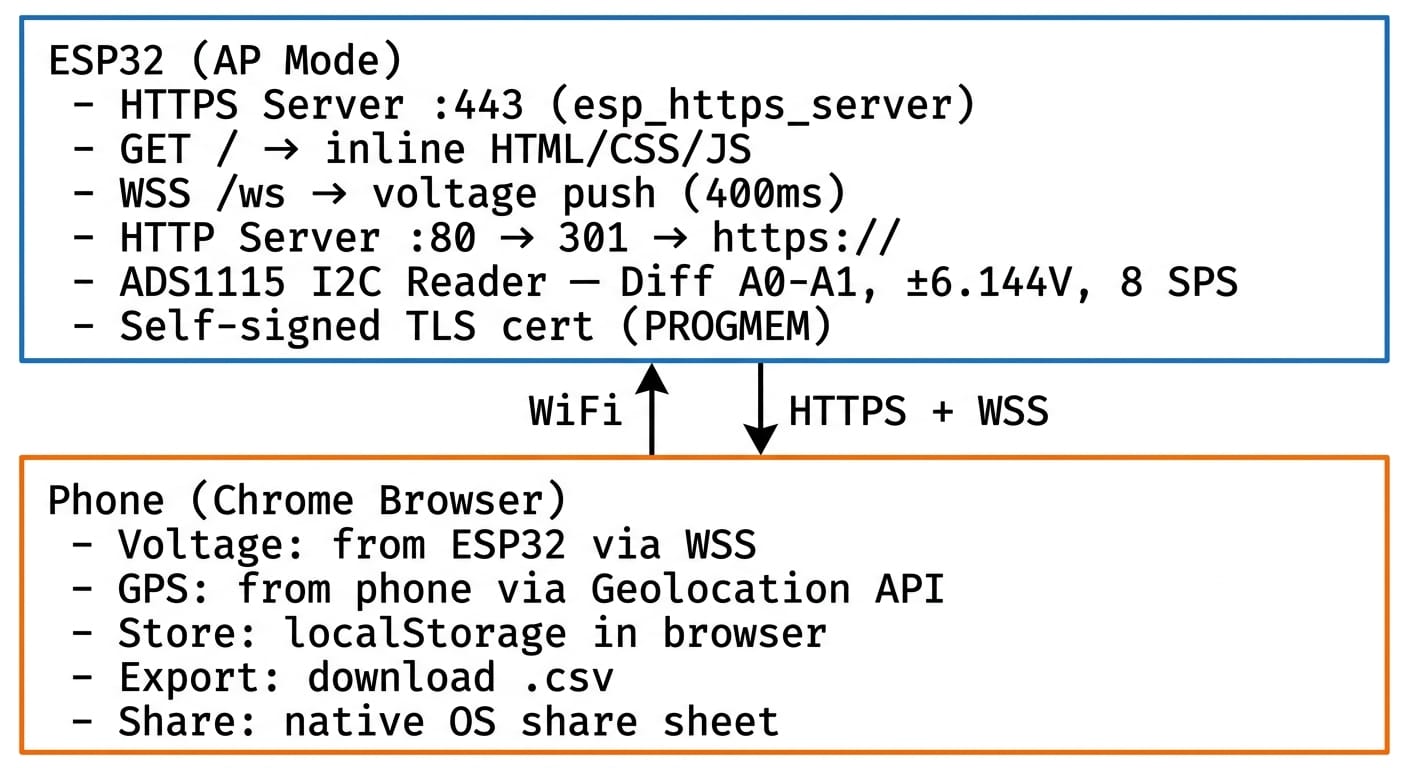
No Bluetooth. No Android app. No app install.
The Build
Iteration 1: BLE → WiFi AP + WebSocket (~30 min)
The agent started by swapping every BLE component for its WiFi equivalent:
| Before (BLE) | After (WiFi) |
|---|---|
BLEServer class | WifiServer class |
| BLE GATT characteristics | HTTP server on port 80 |
| BLE notify (voltage push) | WebSocket server on port 81 |
| Android app (Kotlin) | Web page in Chrome |
BLEDevice.h, BLEServer.h | WiFi.h, WebServer.h, ArduinoWebsockets |
Files deleted: ble_server.h, ble_server.cpp. Files created: wifi_server.h,
wifi_server.cpp. Files modified: VoltGPS_Meter.ino (swap BLE init for WiFi init).
It worked immediately. ESP32 created an open WiFi AP called VoltGPS-Meter. Phone
connected to the network, Chrome pointed at http://192.168.4.1, and there was voltage
— auto-updating every 400ms, dark theme, large digits, color-coded (green for good,
red for out of range, gray for no reading).
Libraries: WiFi.h (built-in), WebServer.h (built-in), ArduinoWebsockets
(third-party).
Iteration 2: GPS from the Browser
The voltmeter had no location data. Adding a GPS module to the ESP32 would mean more wiring, more code, more power draw. But the phone already has GPS — and a browser API to access it.
The agent added all of this as client-side JavaScript — zero ESP32 code changes for GPS:
- GPS display: latitude (6 decimal places), longitude, accuracy in meters
- Store Reading button — captures timestamp, voltage (mV), lat, lon, accuracy
- localStorage persistence — readings survive page refresh
- Incremental reading counter (never resets unless the user clears)
- Export CSV — downloads all readings as a
.csvfile - Share — native OS share sheet (WhatsApp, Email, etc.) via Web Share API
- Clear — with confirmation prompt
- Toast notifications for success/error feedback
- Smart button logic: Store disabled when both voltage AND GPS are null
Offline testing first: the web page was tested on an external HTTPS server before being embedded into the ESP32 firmware. This was important because GPS requires a secure context (HTTPS), and the ESP32 was still serving HTTP at this point. The page was uploaded to a static file server and tested from a phone browser — GPS worked, voltage showed “N/A” (no WebSocket), all store/export/share functions confirmed. Only the HTML/JS file changed; the ESP32 firmware was untouched.
Iteration 3: The HTTPS Problem
Here’s where it got interesting. GPS needs HTTPS — Chrome blocks the Geolocation API on
non-secure origins. Serving from http://192.168.4.1 means GPS is silently blocked.
The agent dispatched 3 parallel research sub-agents, each approaching from a different angle:
| Agent | Research Focus |
|---|---|
| Agent 1 | ESP-IDF official esp_https_server documentation (Espressif docs) |
| Agent 2 | Arduino ESP32 HTTPS approaches — WiFiServerSecure, arduinoWebSockets with TLS, library ecosystem |
| Agent 3 | Web search for best practices — esp32_https_server (fhessel), ESPAsyncWebServer, community examples, cert generation |
All three converged on the same recommendation: esp32_https_server (fhessel) — the
only Arduino library with integrated HTTPS + WebSocket Secure. 400 GitHub stars, Arduino
native, active development.
Then the build failed. The library expects openssl/ssl.h, which existed in
ESP-IDF 4.x (ESP32 Arduino core 2.x) but was removed in ESP-IDF 5.x (core 3.x). Our
project uses core 3.3.7. This wasn’t documented anywhere prominently — discovered at compile
time.
Multi-agent research narrows options, but real-world testing catches what documentation doesn’t.
Pivot: Switched to ESP-IDF native esp_https_server C API — already included in
ESP32 Arduino core 3.x, no third-party library needed:
- C-style callback functions instead of C++ objects
httpd_ssl_start()/httpd_ssl_stop()for server lifecyclehttpd_ws_send_frame_async()for pushing voltage from the main loop to the server task- Server runs in its own FreeRTOS task (no
handleClient()loop needed)
This pivot actually resulted in a cleaner architecture — fewer dependencies, official Espressif components only.
Iteration 4: HTTPS Implementation + Certificate
Self-signed certificate generation:
openssl genrsa -out server.key 2048
openssl req -new -x509 -key server.key -out server.crt -days 3650 \
  -subj "/CN=192.168.4.1/O=VoltGPS/C=CZ"
openssl x509 -in server.crt -outform DER -out cert.der
openssl rsa -in server.key -outform DER -out key.der
xxd -i cert.der > cert.h
xxd -i key.der > private_key.h
Certificate embedded as C arrays in PROGMEM — no SPIFFS or SD card needed. The ESP32 reads the cert directly from flash.
What changed:
| Before (HTTP) | After (HTTPS) |
|---|---|
WebServer.h (Arduino) | esp_http_server.h (ESP-IDF) |
ArduinoWebsockets | esp_http_server WebSocket built-in |
| HTTP port 80 | HTTPS port 443 |
ws://192.168.4.1:81/ | wss://192.168.4.1/ws |
| No cert | Self-signed RSA 2048, 10yr validity |
Testing result: phone connects to VoltGPS-Meter WiFi, Chrome navigates to
https://192.168.4.1, cert warning → “Advanced” → “Proceed”, page loads with voltage
- GPS, GPS permission prompt appears (because HTTPS = secure context), WebSocket Secure pushes voltage every 400ms. All features work: Store, Export CSV, Share, Clear.
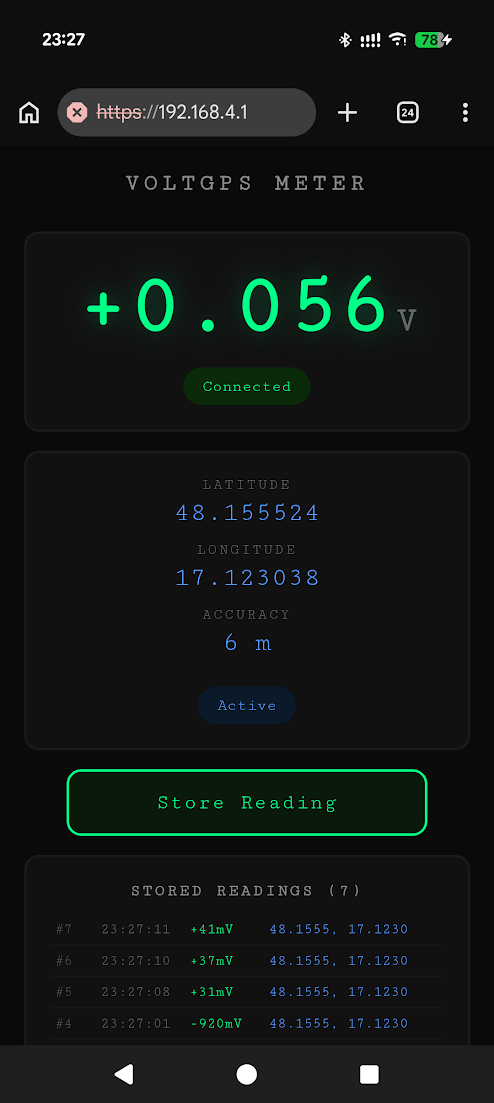
RAM budget: TLS uses ~40–50KB per connection. ESP32 has ~280KB free heap. Max 3–4 concurrent TLS clients — sufficient for a personal voltmeter, but worth knowing if you plan to serve many clients.
Iteration 5: HTTP → HTTPS Redirect + Polish
Typing http://192.168.4.1 (without the ’s’) showed nothing. Users won’t remember to
type https://.
Fix: a second plain HTTP server on port 80 that redirects all requests to
https://192.168.4.1/ with HTTP 301. The ESP-IDF httpd_ssl_start() only starts the
HTTPS server. A separate httpd_start() on port 80 handles the redirect.
Documentation was updated at each milestone. Git commits:
- WiFi AP + WebSocket (baseline before HTTPS changes)
- HTTPS + WSS + GPS web app
- Documentation updates
Key Technical Decisions
| Decision | Options Considered | Chosen | Why |
|---|---|---|---|
| WiFi mode | AP only, STA only, AP+STA | AP only | Simplest, works standalone without router |
| WebSocket library | ArduinoWebsockets, esp32_https_server, ESP-IDF native | ESP-IDF native | Only option compatible with core 3.x HTTPS |
| HTTPS approach | Downgrade core to 2.x, ESP-IDF native, WiFiServerSecure | ESP-IDF native | No dependency, future-proof, built into core |
| Certificate | On-device generation, pre-generated PEM, pre-generated DER | Pre-generated DER in PROGMEM | Fast boot, no SPIFFS needed |
| GPS source | ESP32 GPS module, phone browser API | Browser API | Zero hardware cost, phone already has GPS |
| Data storage | ESP32 SPIFFS/SD, browser localStorage | Browser localStorage | No ESP32 storage needed, survives refresh |
| CSV export | Server-side generate, client-side generate | Client-side Blob API | No ESP32 file system involvement |
| HTTP redirect | Single server dual-port, separate servers | Separate httpd instance on port 80 | Clean separation, httpd_ssl_start only does HTTPS |
Lessons Learned
Library compatibility is a runtime discovery.
esp32_https_serverusesopenssl/ssl.h, removed in ESP-IDF 5.x (Arduino core 3.x). Not documented prominently — we found out at compile time. The fix was the native ESP-IDF C API.GPS requires HTTPS, not just HTTP. The browser Geolocation API only works in secure contexts (
https://orlocalhost). Serving fromhttp://192.168.4.1means GPS is silently blocked. This was the entire reason for the HTTPS migration.Self-signed cert warnings are unavoidable on LAN. No way around it — not with
.localmDNS, not with manual CA import. Options: accept the warning, or use a real domain with Let’s Encrypt (requires public IP + port forwarding).ESP-IDF HTTPS server runs in its own task. Unlike Arduino’s
WebServerwhere you callhandleClient()inloop(), the ESP-IDF server spawns its own FreeRTOS task. WebSocket messages are sent viahttpd_ws_send_frame_async()from the main loop to the server task. Different mental model, cleaner architecture.TLS RAM budget is tight. Each TLS connection uses ~40–50KB. With 4 max connections, that’s ~200KB of the ~280KB free heap. The voltage reading loop + ADS1115 + WiFi stack leaves little room. 3–4 concurrent clients is the practical limit.
Multi-agent research is powerful but doesn’t guarantee the right answer. Three parallel agents researched HTTPS approaches and all converged on the same library. It was the correct recommendation based on available information — but none of them knew it was incompatible with ESP32 core 3.x until compile time.
Testing HTML offline first saves time. The GPS web page was developed and tested on an external HTTPS server before being embedded in ESP32 firmware. GPS functionality was validated independently — when it came time to put it on the ESP32, only the HTTPS transport layer needed testing.
Next Steps: WiFiManager
The voltmeter currently runs in AP mode — the ESP32 creates its own WiFi network, and the phone has to disconnect from the home network to connect to it. That means no internet while measuring voltage.
The fix is WiFiManager — the same approach we used on the ESP8266 years ago. On boot, the ESP32 tries to connect to a saved WiFi network. If it fails, it starts a captive portal where you configure credentials via your phone. The ESP32 then connects to your home network and serves the voltmeter over STA mode — the phone keeps internet access while reading voltage.
On ESP32, credentials would be stored in NVS (Non-Volatile Storage) rather than the EEPROM we used on ESP8266. NVS is the ESP32’s native flash storage — key-value pairs, wear-leveling, survive reboots and firmware updates.
We’re evaluating whether to add WiFiManager to this project next. The benefit is clear: no more switching WiFi networks, and remote monitoring becomes possible if the ESP32 has internet access.
Final Thoughts
No Bluetooth. No Android app. No app install. Open phone browser, accept the certificate, see voltage + GPS. The whole migration took 5 iterations — each one proposed by an AI coding agent, tested on real hardware, and either confirmed or discarded based on what actually worked. The biggest pivot (Arduino HTTPS library → ESP-IDF native API) came from a build failure that no amount of research could have predicted. The agent’s value wasn’t in knowing the right answer upfront — it was in responding fast when the right answer changed.
If you haven’t tried OpenCode for hardware projects, I’d genuinely recommend it. Having an agent that can build, flash, read serial output, and iterate — all on real hardware — changed how I work on ESP32 projects. OpenCode Go at $10/month is more than enough for hobby work like this.
Sources
- ESP-IDF HTTPS Server Documentation — official Espressif docs for the native HTTPS server API
- Random Nerd Tutorials: ESP32 HTTPS — common Arduino ESP32 HTTPS patterns
- esp32_https_server (fhessel) — Arduino HTTPS library (turned out incompatible with core 3.x)
- ESPAsyncWebServer — popular async web server (no TLS support)
- MDN: Geolocation API —
navigator.geolocation.watchPosition(), secure context requirements - MDN: Web Share API —
navigator.share()with file support - Chrome secure context specification — HTTPS requirement for Geolocation, clipboard, and other sensitive APIs
- ESP-IDF
esp_http_serverWebSocket API —httpd_ws_send_frame_async(),httpd_ws_frame_t