From Local to Cloud GPU: Ollama on a Rented A100

134 tokens per second on a 35-billion-parameter model. That is what an NVIDIA A100 produces for $1.40 an hour — rented in the cloud, no hardware to buy, no drivers to fight. The plan was simple: spin up a pod, install Ollama, and see what consumer-unfriendly hardware actually buys you.
The GPU vanished the next morning. And the cheaper replacement taught me something the A100 couldn’t.
In Part 1 — Local AI Without the Cloud,
we ran nine models on a 16 GB Mac and hit a hard ceiling: one model at a
time, 12B parameters max, ~10 tok/s on gemma4:12b. Usable, but slow.
The obvious next question was whether renting a real datacenter GPU
changes the math. So I opened a RunPod account, picked an A100 PCIe
(80 GB VRAM), and pointed it at the same Ollama + Open WebUI stack.
This post is what happened over the next 36 hours — including the part where everything broke.
The Hardware: What $1.40/Hour Buys
The pod configuration:
| Resource | Allocation |
|---|---|
| GPU | 1× NVIDIA A100 PCIe (80 GB VRAM) |
| vCPU | 16 |
| RAM | 125 GB |
| Disk | 90 GB container + 10 GB network volume |
| Region | EU |
| Cost | $1.40/hr (billed per millisecond) |
The cost breaks down to $1.39/hr for the GPU itself, $0.011/hr for the container disk, and $0.001/hr for the network volume. RunPod bills per millisecond, so you only pay for the time the pod is actually running — not while it is stopped.
One thing that surprised me: the host machine’s actual resources are much
larger than what the pod sees. free -h reported 1.5 TiB of RAM and
nproc returned 128 threads on an AMD EPYC 9374F (32 cores). The
125 GB / 16 vCPU in the pod config is the slice you get; the host is
shared across multiple tenants. This matters when a noisy neighbour
saturates the PCIe bus, or the host runs out of free GPUs to resume your
pod — which is exactly what happened on day two.
Setup: From Empty Container to Running LLM
The pod boots from the better-ollama-webui:cuda12.4 template, which
bundles Ollama and Open WebUI. But out of the box, DNS resolution was
broken and Ollama was pinned to localhost. The actual bring-up looked
like this.
Fix DNS, sync the clock
echo "nameserver 8.8.8.8" >> /etc/resolv.conf
echo "nameserver 8.8.4.4" >> /etc/resolv.conf
apt-get update
timedatectl set-ntp true
Install Ollama, bind to all interfaces
The template ships an older Ollama, so I reinstalled from upstream and
restarted it listening on 0.0.0.0 so the proxy could reach it:
apt-get install -y zstd htop mc
curl -fsSL https://ollama.com/install.sh | sh
pkill ollama; sleep 2; OLLAMA_HOST=0.0.0.0:11434 ollama serve &
Open WebUI
python3.11 -m pip install --upgrade pip
pip install open-webui --upgrade
pkill -f open-webui; sleep 2; open-webui serve &
Access from outside the pod
RunPod exposes each pod port through an HTTPS proxy URL of the form
https://<pod-id>-11434.proxy.runpod.net/. Any request to that URL is
tunnelled to localhost:11434 inside the container. So from my laptop,
anywhere on the internet, I could hit the Ollama API directly:
curl https://<pod-id>-11434.proxy.runpod.net/api/generate \
  -H "Content-Type: application/json" \
  -d '{
    "model": "gemma4:12b",
    "prompt": "Write a haiku about networking",
    "stream": false
  }'
This proxy is the key piece — no VPN, no port forwarding, no firewall wrangling. The pod gets a stable public HTTPS endpoint the moment it starts.
Architecture
┌─────────────────────────┐   HTTPS proxy   ┌──────────────────────────┐
│  Your laptop (anywhere) │────────────────►│  RunPod Pod (EU)         │
│                         │                 │  ├─ Ollama      :11434   │
│  browser → Open WebUI   │◄────────────────│  └─ Open WebUI  :8080    │
│  curl   → Ollama API    │   JSON response │       A100 / A6000 GPU   │
└─────────────────────────┘                 └──────────────────────────┘
Day 1: Benchmarking on the A100
I pulled three models and reused the benchmark script from Part 1 —
a curl + jq loop that logs every run to ollama_log.csv:
ollama pull gemma4:12b
ollama pull qwen3.6:35b
ollama pull gemma4:31b
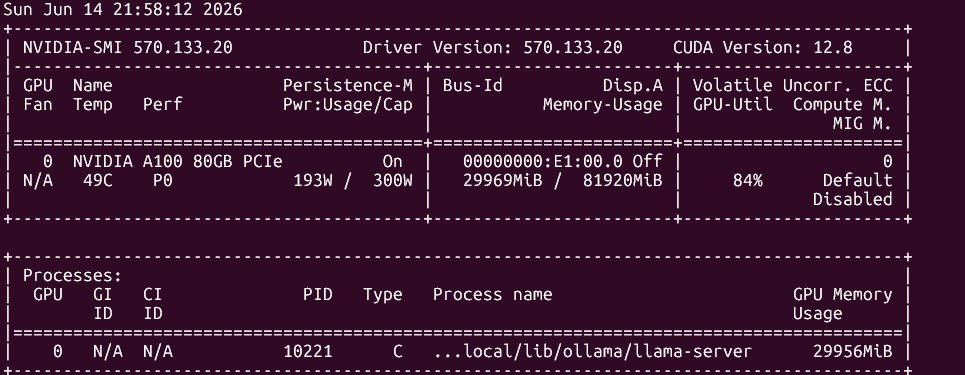
nvidia-smi on the A100 pod — 80 GB VRAM, barely touched by a 12B model.Results
15 runs across two models, same prompts as the Mac benchmarks. The A100 does not break a sweat.
| Model | Runs | Avg tok/s | Min | Max | Avg tokens/run | Avg time |
|---|---|---|---|---|---|---|
gemma4:12b | 5 | 77.6 | 77.2 | 78.0 | ~1,773 | 23.9 s |
qwen3.6:35b | 10 | 134.0 | 133.5 | 134.8 | ~2,829 | 22.5 s |
Two things stand out.
The absolute speed. qwen3.6:35b — a 35-billion-parameter model —
generates at 134 tok/s. On the 16 GB Mac, the much smaller lfm2.5:8b
topped out at 67 tok/s. The A100 runs a model more than four times the
size at twice the speed. gemma4:12b alone jumps from 10.4 tok/s on the
Mac to 77.6 tok/s on the A100 — a 7.5× speedup on the same model,
same prompt, same Ollama.
The consistency. qwen3.6:35b sat between 133.5 and 134.8 tok/s
across all ten runs — a spread of 1.3 tok/s, or under 1%. The A100 has
no thermal throttling story, no memory-bandwidth contention. It just
runs at its rate, every time. Compare that to the Mac, where lfm2.5:8b
swung between 55 and 80 tok/s. If you need predictable latency for a
pipeline, this is the difference between “probably fast enough” and
“guaranteed.”
Day 2: The GPU Vanishes
The next morning I stopped the pod to save on billing and prepared to
spend the day benchmarking gemma4:31b — the one size class the Mac
could never run. Hit resume.
Resume failed.
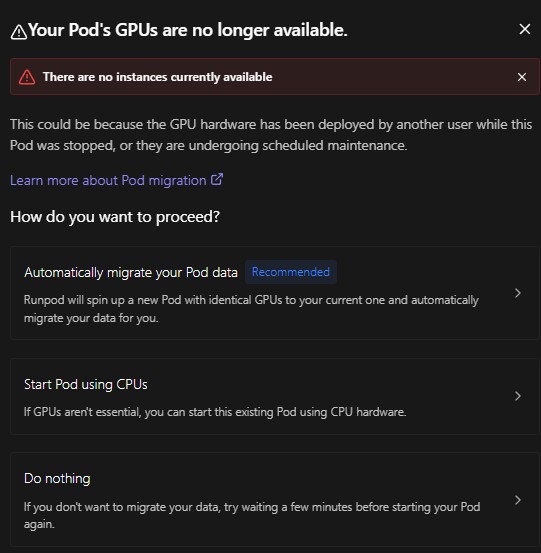
Your Pod’s GPUs are no longer available.
This is the cloud-GPU reality the marketing pages do not mention: you do not own the hardware. A100s are the most-demanded cards on the platform, and when the host machine fills up, your stopped pod is stranded. It cannot restart until someone else stops theirs. No ETA, no queue position, no notification — you check back periodically and hope.
I could have waited. Instead I scrolled down the GPU list.
The Pivot: RTX A6000 at $0.50/Hour
Three rows below the A100 sat the RTX A6000 — 48 GB VRAM, roughly a third of the price. I deployed a fresh pod:
| Resource | A100 pod (day 1) | A6000 pod (day 2) |
|---|---|---|
| GPU | A100 PCIe (80 GB VRAM) | RTX A6000 (48 GB VRAM) |
| vCPU | 16 (AMD EPYC 9374F) | 12 (Intel Xeon Gold 6342) |
| RAM | 125 GB | 62 GB |
| Disk | 90 GB | 80 GB |
| Cost | $1.40/hr | $0.50/hr |
For 36% of the price, I got 60% of the VRAM and a different CPU entirely. The A6000 is a workstation card rather than a datacenter GPU, but it has the one thing that matters for LLM inference: enough VRAM to hold the model.
Same setup sequence (DNS, Ollama, Open WebUI), same proxy access. Within
ten minutes the new pod was running and gemma4:31b was loaded.
Running gemma4:31b on the A6000
gemma4:31b is the model I had wanted to test all along — 31.3 billion
parameters, Q4_K_M quantization, 262k context window. On the Mac this was
impossible; on the A100 I ran out of time. The A6000 finally gave it a
home.
$ ollama ps
NAME           ID              SIZE     PROCESSOR    CONTEXT    UNTIL
gemma4:31b     4e7b9c2a8f15    20 GB    100% GPU     262144     4 minutes from now
Six runs with the same benchmark prompt:
| Model | GPU | Runs | Avg tok/s | Min | Max |
|---|---|---|---|---|---|
gemma4:31b | RTX A6000 (48 GB) | 6 | 29.0 | 28.0 | 29.6 |
The trimmed-context gemma4:31b-small (next section) matched it within
noise — five runs averaged 29.4 tok/s. Trimming the context window frees
VRAM without costing throughput, because generation speed is bound by
model weights, not cache size.
29 tok/s on a 31B model for fifty cents an hour is a perfectly usable
chat experience. For context, the Mac managed 10 tok/s on the smaller
gemma4:12b.
Where the VRAM goes
ollama show breaks the memory budget down:
| Component | Size |
|---|---|
| Model weights (Q4_K_M) | ~20 GB |
| KV cache (262,144-token context) | ~21 GB |
| Total resident | ~41 GB |
Here is the catch. The model weights are 20 GB. The other 21 GB — more than half the total footprint — is the KV cache for a 262k token context window. That is the maximum context the model supports. It is almost certainly not the context you need.
The context window you pay for and never use
gemma4:31b advertises a 262,144-token context window. That sounds
impressive, but Ollama pre-allocates KV cache for the full window up
front, and that cache scales with context length. For a chat assistant
where most conversations are a few thousand tokens, 262k of headroom is
dead weight — VRAM you paid for and never fill.
The fix is to derive a trimmed Modelfile with a smaller num_ctx:
ollama show gemma4:31b --modelfile > Modelfile
# edit Modelfile: add the line
#   PARAMETER num_ctx 32768
ollama create gemma4:31b-small -f Modelfile
ollama create rebuilds the model with a 32,768-token context budget —
still a generous window (roughly 24,000 words, enough for long documents
or extended conversations), but an eighth of the default. The effect on
VRAM, measured directly via nvidia-smi:
| Variant | num_ctx | VRAM resident |
|---|---|---|
gemma4:31b (default) | 262,144 | 41,514 MiB |
gemma4:31b-small (trimmed) | 32,768 | 23,992 MiB |
Over 40% of the VRAM, gone — with no effect on a normal-length conversation. The model weights did not change; only the pre-allocated cache shrank. This single setting is the difference between “needs a 48 GB GPU” and “fits on a 24 GB GPU.” It is the most expensive line in an Ollama Modelfile, and almost nobody mentions it.
This is why I am glad the A100 disappeared. On 80 GB VRAM the waste is invisible — 41 GB fits with room to spare, so you never look. On the A6000’s 48 GB, the same 41 GB footprint ate almost everything and forced the question. The constraint taught the lesson the comfortable hardware hid.
Three Tiers, Compared
Apples to apples — the same models across the hardware that can run them. Empty cells are deliberate: they mark combinations that were never measured, or that the hardware cannot hold.
| Model | Mac — 16 GB ($0) | A100 — 80 GB ($1.40/hr) | A6000 — 48 GB ($0.50/hr) |
|---|---|---|---|
gemma4:12b | 10.4 tok/s | 77.6 tok/s | 59.4 tok/s |
qwen3.6:35b | won’t fit (16 GB) | 134.0 tok/s | 123.5 tok/s |
gemma4:31b | won’t fit (16 GB) | not tested — pod died | 29.0 tok/s |
The clean head-to-head is the gemma4:12b row between Mac and A100: same
model, same prompt, same Ollama — 10.4 → 77.6 tok/s, a 7.5× speedup.
The A100 then pulls further ahead on the larger qwen3.6:35b (134 tok/s),
a model the Mac cannot load at all.
But the real surprise is the A6000 column. On qwen3.6:35b it turns in
123.5 tok/s — 92% of the A100’s 134.0, for 36% of the price. That is
roughly 2.5× the throughput per dollar. The gap widens on the smaller
gemma4:12b (59.4 vs 77.6 tok/s, the A6000 at 77% of the A100), but it
never opens up the way the price difference implies. The A100’s premium
buys VRAM headroom and tighter consistency — its 35B runs held within 1%,
the A6000’s spread to 7% — not proportional speed.
The Mac still wins on cost and privacy: $0, in your bag, no data leaves
the network. Its ceiling is 12B. The cloud tiers exist for everything
above that, and between them the cheaper card is the one to reach for
first.
Problems & Solutions
| Problem | Cause | Fix |
|---|---|---|
| DNS broken in fresh pod | Template’s /etc/resolv.conf empty | Manually add 8.8.8.8 / 8.8.4.4 |
| Pod will not resume next day | No free A100s on the host | Switch GPU tier, or wait indefinitely |
gemma4:31b eats 41 GB VRAM | Default 262k context KV cache | Set PARAMETER num_ctx 32768, rebuild |
Lessons Learned
The context window is the most expensive parameter. Ollama pre-allocates KV cache for the model’s full advertised context — 262k for
gemma4:31b. Trimming to 32k cut the VRAM by over 40%. Always checknum_ctxbefore assuming a model “needs” a big GPU.Cloud GPU availability is volatile. A stopped pod is not a reservation — if the host fills up, you wait. Have a fallback tier in mind before you start. The A6000 was not my first choice; it became the better one.
The expensive GPU is rarely worth it for inference. On
qwen3.6:35bthe A6000 delivered 92% of the A100’s throughput (123.5 vs 134.0 tok/s) for 36% of the price — about 2.5× the value per dollar. The A100’s premium buys VRAM headroom and tighter consistency, not proportional speed. Reach for the cheaper card first.The proxy URL is the whole networking story. No VPN, no port forwarding — RunPod’s HTTPS proxy gives every pod a public endpoint. This is the part that makes cloud GPUs actually pleasant to use from a laptop.
Consistency scales with hardware class. The A100 held 134 tok/s within 1% across ten runs. The Mac swung ±20%. For batch pipelines where you quote an SLA, that predictability is worth money.
Forced failure beats comfortable success. I went looking for an A100 and got an A6000 instead. The detour surfaced the
num_ctxlesson, cut the VRAM footprint by over 40%, and produced a more reusable setup than the original plan would have.
Final Thoughts
The original goal was “see what an A100 does.” It does 134 tok/s on a 35B model, it does it every time without variation, and it does it for a dollar forty an hour. That part of the experiment worked.
The interesting part was the failure. When the A100 would not come back, the cheaper card forced a question the expensive one had let me skip: why does a 20 GB model occupy 41 GB of VRAM? The answer — a 262k context window I was never going to use — is the kind of detail that only surfaces under pressure. Trim the context, and a 48 GB card runs a 31B model with headroom to spare.
I am genuinely glad the A100 disappeared. It taught two lessons the
original plan would have missed: the context window — not the model — is
what eats VRAM, and a $0.50 workstation card delivers 92% of a $1.40
datacenter GPU on the model I actually wanted to run. Next time I will
set num_ctx before I look at the GPU list, and I will start at the
cheap end of it.