Local AI Without the Cloud: Ollama, Open WebUI, and Nine Models Benchmarked on a 16 GB Mac
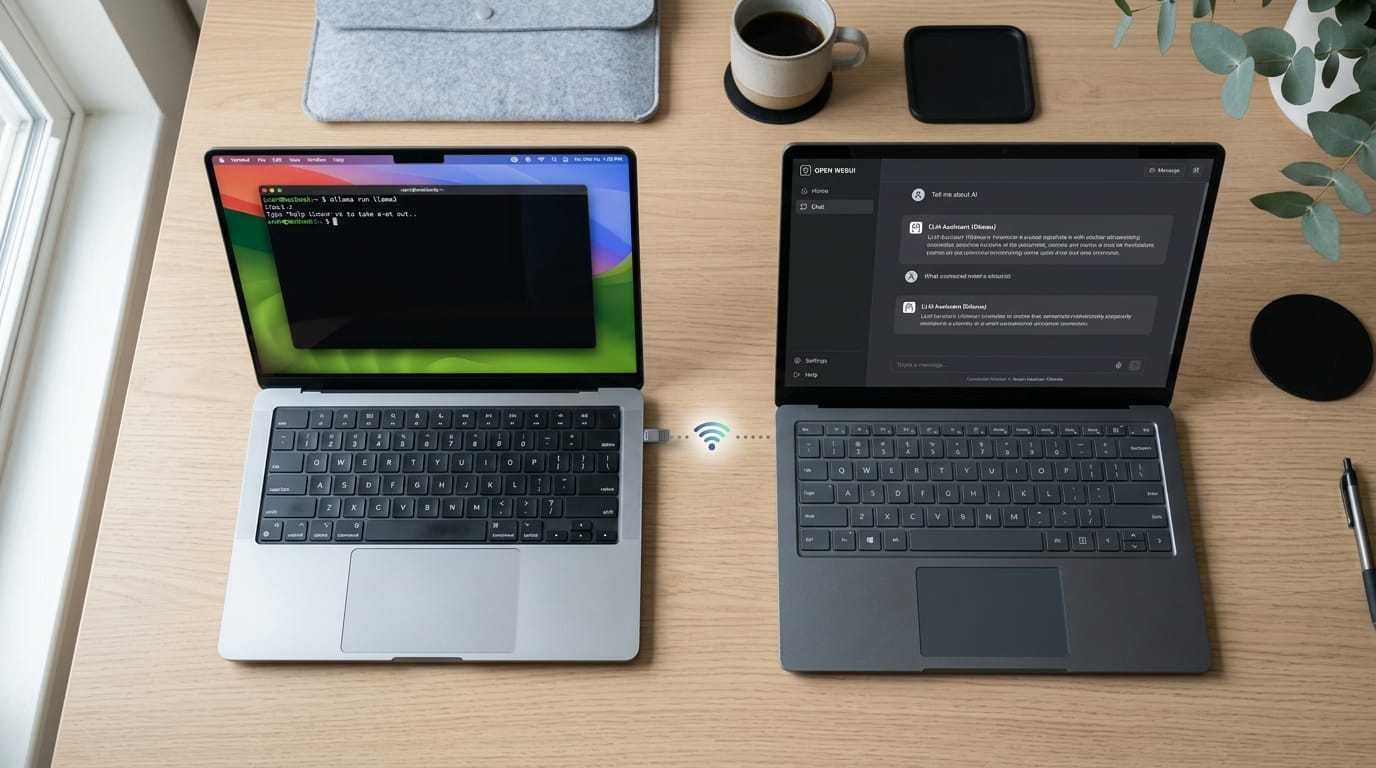
Nine models, one Mac, zero cloud. We benchmarked LLMs from 3B to 12B parameters entirely on a MacBook Air 13" (Apple M4, 16 GB, 2025) — no discrete GPU, no API keys, no data leaving the network. The fastest model answered at 67 tokens/second. The most consistent had zero variance across 5 runs. Total cost for all testing: $0.00.
The motivation was straightforward: privacy, cost, and curiosity. We wanted to run large language models on consumer hardware without sending prompts to external APIs. No rate limits, no subscription fees, no “your data may be used to improve our models.” And we wanted to know — is a 16 GB Mac actually usable for this, or just a toy demo?
Spoiler: it’s usable. With some caveats.
Why Apple Silicon Changes the Game
On a traditional PC, the CPU and GPU have separate memory pools. Your GPU might have 8 GB of VRAM and your system 32 GB of RAM — but the model can only use one pool at a time. Most quantized models in the 7–12B parameter range need 4–10 GB of VRAM to run at reasonable speed. That means a dedicated GPU with enough onboard memory.
Apple Silicon uses unified memory. The same 16 GB is accessible by both the CPU and the GPU (Neural Engine). A model that fits within that budget just works — no discrete GPU, no memory copying between pools. This is the single reason consumer Macs are viable for local LLM inference.
Installing Ollama
Ollama handles model downloading, quantization management, and exposes a simple HTTP API. It’s the easiest way to run open-weight models locally.
ollama list
ollama pull gemma4:12b
ollama pull lfm2.5:8b
Useful commands: ollama ps shows which model is currently loaded in RAM.
ollama list shows all downloaded models.
Models are several GB each — gemma4:12b is ~7.6 GB, lfm2.5:8b is ~5.2 GB.
Downloads are resumable; re-running ollama pull picks up where it left off.
Browse available models at the Ollama model library — we used gemma4, lfm2 and their MLX variants.
Ollama starts a local HTTP server on http://localhost:11434. The API is
plain REST — no SDK required. To watch what’s happening under the hood:
tail -f .ollama/logs/server.log
A quick test call:
curl http://localhost:11434/api/generate -d '{
  "model": "gemma4:12b",
  "prompt": "Write a haiku about networking",
  "stream": false
}'
Exposing Ollama on the LAN
By default, Ollama only listens on localhost. To make it accessible from other devices on the network — a Windows PC running a web UI, for example — set the environment variable before starting:
OLLAMA_HOST=0.0.0.0 ollama serve
After this, any device on the same network can reach the API at
http://192.168.1.x:11434.
Note: This exposes the API without authentication. Only do this on a trusted private network.
Keeping the Mac Awake
macOS aggressively sleeps the machine when the lid is closed or it goes idle, which kills the Ollama server. This single command prevents sleep entirely and lets you close the lid:
sudo pmset -a disablesleep 1 && caffeinate -i -m -u
pmset -a disablesleep 1 disables sleep across all power sources (battery +
AC). caffeinate keeps the system active — -i prevents idle sleep, -m
prevents disk sleep, -u simulates user activity. The Mac stays awake and
Ollama remains reachable even in clamshell mode.
To re-enable sleep later:
sudo pmset -a disablesleep 0
We went with this approach — the Mac sits closed on the desk, permanently available on the network as an inference server.
First Impressions
The first three models we tested, all running locally via Ollama on the same Mac, using the same prompt: “Hi, create simple HTML about LLM”
| Model | Size on disk | Parameters | First impression |
|---|---|---|---|
gemma4:e4b-mlx | ~9.6 GB | ~4B (MoE) | Good quality, moderate speed |
gemma4:12b | ~7.6 GB | 12B | Best responses, noticeably slower |
lfm2.5:8b | ~5.2 GB | 8B | Fastest by far, snappy |
First impression: lfm2.5:8b feels like a responsive chatbot. gemma4:12b
feels like talking to a smarter model that takes its time. gemma4:e4b-mlx
sits somewhere in between.
The quality difference is real — gemma4:12b produces longer, more detailed
responses with better structure. But at 12 tok/s, you’re waiting.
lfm2.5:8b at ~67 tok/s feels instantaneous by comparison.
Open WebUI + SearXNG: Chat Frontend with Private Search
Running curl commands is fine for testing. For daily use, you want a proper
chat interface. We set up two Docker containers on a Windows machine on the
same LAN: Open WebUI as the chat frontend and
SearXNG as a privacy-respecting
metasearch engine for web-grounded answers.
services:
  searxng:
    image: docker.io/searxng/searxng:latest
    container_name: searxng
    restart: unless-stopped
    ports:
      - "8888:8080"
    volumes:
      - ./searxng:/etc/searxng:rw
    environment:
      - SEARXNG_SECRET=${SEARXNG_SECRET}
    networks:
      - ai-net

  open-webui:
    image: ghcr.io/open-webui/open-webui:main
    container_name: open-webui
    restart: always
    ports:
      - "3000:8080"
    entrypoint: ["/bin/sh", "/seed/init-db.sh"]
    environment:
      - OPENAI_API_BASE_URL=http://${OLLAMA_HOST}:11434/v1
      - OPENAI_API_KEY=ollama
    volumes:
      - open-webui-data:/app/backend/data
      - ./webui-seed:/seed:ro
    depends_on:
      - searxng
    networks:
      - ai-net

networks:
  ai-net:
    driver: bridge

volumes:
  open-webui-data:
Open http://localhost:3000 in the browser. A few things worth noting:
OPENAI_API_BASE_URLpoints to Ollama’s OpenAI-compatible endpoint (/v1), not the native Ollama API. The Mac’s IP comes from a.envfile (OLLAMA_HOST=192.168.1.x).OPENAI_API_KEY=ollama— Ollama doesn’t require a real key, but Open WebUI needs something in this field to enable the connection.webui-seed/contains an init script that pre-seeds the database with model definitions, so the UI shows available models on first launch without manual configuration.- The Windows machine does zero inference. It’s just a frontend. All the heavy lifting runs on the Mac.
┌──────────────────┐       LAN        ┌────────────────────────────┐
│  Mac (Ollama)    │◄────────────────►│  Windows (Docker)           │
│  16 GB unified   │  HTTP :11434/v1  │  ├─ Open WebUI (:3000)      │
│  Apple M4        │                  │  └─ SearXNG (:8888)         │
└──────────────────┘                  └────────────────────────────┘
Benchmarking: The Stats Script
Subjective “feels fast” impressions weren’t enough. We wrote a Bash script
that calls Ollama’s API, parses the response with jq, and logs every run
to a CSV file.
What It Measures
| Field | Description |
|---|---|
total_s | Wall-clock time for the full request |
load_s | Time to load the model into memory |
prompt_s | Time to evaluate the input prompt |
eval_s | Time spent generating the response |
eval_tokens | Number of tokens generated |
gen_speed | Tokens per second |
The Script
#!/usr/bin/env bash
PROMPT="Hi, create simple HTML about LLM"
LOG="ollama_log.csv"

MODELS=$(curl -s http://localhost:11434/api/tags | jq -r '.models[].name')
echo "Available models:"
echo "$MODELS" | nl
read -p "Pick model number: " NUM
MODEL=$(echo "$MODELS" | sed -n "${NUM}p")

RESPONSE=$(curl -s http://localhost:11434/api/generate -d "$(jq -n \
  --arg m "$MODEL" --arg p "$PROMPT" \
  '{model: $m, prompt: $p, stream: false}')")

eval_count=$(echo "$RESPONSE" | jq '.eval_count // 0')
eval_ns=$(echo "$RESPONSE" | jq '.eval_duration // 0')
load_ns=$(echo "$RESPONSE" | jq '.load_duration // 0')
prompt_count=$(echo "$RESPONSE" | jq '.prompt_eval_count // 0')
prompt_ns=$(echo "$RESPONSE" | jq '.prompt_eval_duration // 0')

eval_s=$(echo "scale=2; $eval_ns / 1000000000" | bc)
load_s=$(echo "scale=2; $load_ns / 1000000000" | bc)
prompt_s=$(echo "scale=2; $prompt_ns / 1000000000" | bc)
total_s=$(echo "scale=2; $load_s + $prompt_s + $eval_s" | bc)

if [ "$(echo "$eval_s > 0" | bc)" -eq 1 ]; then
  speed=$(echo "scale=1; $eval_count / $eval_s" | bc)
else
  speed=0
fi

echo "Model:      $MODEL"
echo "Tokens:     $eval_count"
echo "Speed:      $speed tok/s"
echo "Total time: ${total_s}s"
echo "Load time:  ${load_s}s"

echo "$(date -Iseconds),$MODEL,$prompt_count,$eval_count,$speed,$load_s,$prompt_s,$eval_s,$total_s" >> "$LOG"
Final Benchmark Results
Each model was tested with at least 5 runs using the same prompt (lfm2.5:8b
got 15 runs due to its high variance). Total: 55 runs across 9 models.
| Model | Runs | Avg tok/s | Min tok/s | Max tok/s | Avg time |
|---|---|---|---|---|---|
lfm2.5:8b | 15 | 66.9 | 54.8 | 80.5 | 15.9 s |
llama3.2:3b | 5 | 44.8 | 43.4 | 45.6 | 13.6 s |
gemma4:e4b-it-qat | 5 | 31.0 | 30.9 | 31.0 | 40.3 s |
gemma4:e4b-mlx | 5 | 28.4 | 28.0 | 28.8 | 57.9 s |
gemma4:e4b | 5 | 24.3 | 22.3 | 25.4 | 77.1 s |
mistral:latest | 5 | 22.4 | 22.3 | 22.5 | 20.8 s |
gemma4:12b-it-qat | 5 | 12.7 | 12.5 | 12.8 | 123.4 s |
gemma4:12b | 5 | 10.4 | 9.9 | 11.2 | 174.0 s |
gemma4:12b-mlx | 5 | 10.1 | 9.1 | 11.1 | 204.1 s |
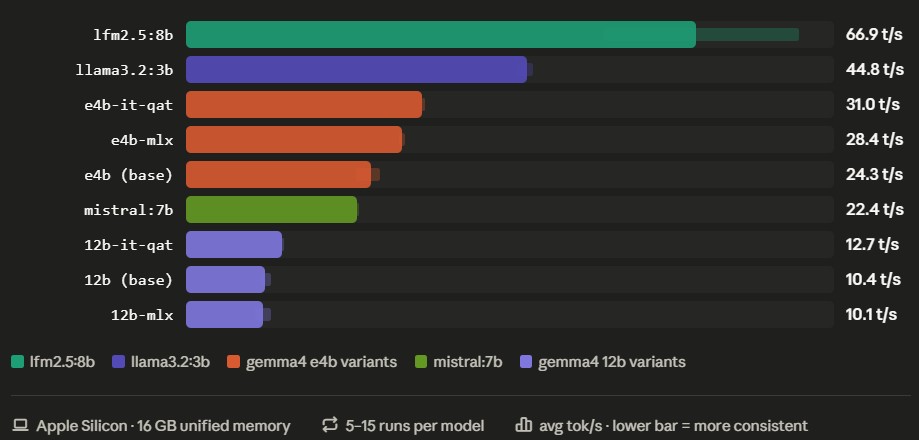
Key observations:
lfm2.5:8bis the clear speed winner at 66.9 tok/s average across 15 runs, but has notable variance (55–80 tok/s). It appears to alternate between two performance states — possibly related to thermal throttling or memory bandwidth contention on the 16 GB Mac.gemma4:e4b-it-qatis the most consistent model tested. 30.9 to 31.0 tok/s across all 5 runs. Zero variance. If you need predictable response times, this is the one.- e4b variant ranking is clear: QAT (31.0 tok/s) > MLX (28.4) > base
(24.3). But the base
gemma4:e4bgenerated the most tokens on average (~1,845 vs ~1,500 for MLX/QAT). The optimized variants may slightly truncate responses in exchange for speed, or the base model simply responds more verbosely by default. - MLX optimization does NOT help with 12B models. This was surprising.
gemma4:12b-mlx(10.1 tok/s) is actually slower thangemma4:12b-it-qat(12.7 tok/s) — the opposite of what we saw with the 4B models, where MLX and QAT were roughly equal. At 12B parameters on 16 GB unified memory, the QAT weights squeeze out better performance. gemma4:12b-mlxalso showed the worst variance — 9.1 to 11.1 tok/s, with average total times of 204 seconds per response. Over 3 minutes of waiting.mistral:latestis a solid middle-ground — 22.4 tok/s, consistent across all runs, finishes in about 20 seconds. Reliable without being exciting.- Load time drops to near-zero after the first run. The model stays resident in unified memory. Only the first call pays the loading penalty.
- Only one model fits at a time in 16 GB. Switching models evicts the current one and loads the new one — a few seconds of delay.
Recommendations by Use Case
On a 16 GB Mac, the sweet spot depends on what you need:
| Use case | Best model | Why |
|---|---|---|
| Speed + detail | lfm2.5:8b | 67 tok/s, full responses in ~16 s |
| Speed + consistency | gemma4:e4b-it-qat | 31 tok/s, rock-solid zero variance |
| Quick answers | llama3.2:3b or mistral:latest | Fast, medium-length responses |
| Highest quality | gemma4:12b | Best output quality, use QAT variant for speed |
One important correction from our earlier testing: when we first looked at QAT weights, the 4B models showed no difference vs MLX on Apple Silicon, and we concluded “stick with MLX on Mac.” The 12B results change that advice — for larger models, QAT actually outperforms MLX on 16 GB unified memory. The takeaway: test both variants, don’t assume.
Going Deeper: Running MLX Directly Without Ollama
After benchmarking everything through Ollama, we went one layer deeper. What happens if we bypass Ollama entirely and run the MLX framework directly? Same machine, same prompt, same 16 GB unified memory — just a different inference path.
Setup
python3 -m venv ~/mlx-env
source ~/mlx-env/bin/activate
pip install mlx-vlm==0.6.2

python -m mlx_vlm.server --port 11434
The MLX VLM server exposes an OpenAI-compatible API (/v1/chat/completions),
so it’s a drop-in replacement for Ollama’s endpoint — Open WebUI connects
without changes. We used the mlx-community/gemma-4-12B-it-OptiQ-4bit model
(stored locally as gemma-4-12b-optiq).
We wrote a separate benchmark script (mlx_bench.sh) for the MLX API since
the response format differs from Ollama’s native API. Results go to the same
CSV for direct comparison. The script also captures peak_memory from MLX’s
timings object — a metric Ollama does not expose.
Results
| Model | Avg tok/s | Min | Max | Avg time | Tokens/run |
|---|---|---|---|---|---|
gemma-4-12b-optiq (MLX direct) | 10.3 | 9.8 | 10.7 | 120.5 s | 1,232 |
All four 12B variants compared:
| Model | Avg tok/s | Min | Max | Avg time |
|---|---|---|---|---|
gemma4:12b-it-qat (Ollama) | 12.7 | 12.5 | 12.8 | 123.4 s |
gemma4:12b (Ollama) | 10.4 | 9.9 | 11.2 | 174.0 s |
gemma-4-12b-optiq (MLX direct) | 10.3 | 9.8 | 10.7 | 120.5 s |
gemma4:12b-mlx (Ollama) | 10.1 | 9.1 | 11.1 | 204.1 s |
Key insights:
- Raw token speed is nearly identical. MLX direct (10.3 tok/s) matches
Ollama
gemma4:12bbase (10.4 tok/s). Running MLX directly does not give a free speed boost for 12B models. - But total time is 30% faster. MLX direct finished in 120.5 s vs 174 s
for Ollama
gemma4:12b. The reason: MLX generated exactly 1,232 tokens every single run — zero variance in output length — while Ollama’s 12b base generated 1,345–2,427 tokens per run with high variance. - Ollama QAT still wins.
gemma4:12b-it-qatvia Ollama at 12.7 tok/s remains the fastest 12B option. Running MLX directly does not beat the QAT variant. - Extraordinary consistency. 9.8 to 10.7 tok/s across 5 runs, and identical token count every time. This suggests near-deterministic generation, likely because the OptiQ quantization fixes sampling behavior. For automated pipelines where predictability matters, this is valuable.
RAG: Querying Your Own Documents
Open WebUI has built-in RAG (Retrieval-Augmented Generation). Upload documents (PDF, text), the system indexes them locally, and the model answers questions grounded in their content — fully offline.
With SearXNG running alongside Open WebUI in the same Docker network, the model can also retrieve current information from the web and cite its sources — configured under Settings → Web Search. All search queries go through SearXNG, which proxies requests to multiple search engines without tracking or logging. This is where local LLMs start feeling genuinely useful: private, offline-capable RAG over your own files, with web grounding and no data leaving your network.
Things We Learned the Hard Way
| Problem | Cause | Fix |
|---|---|---|
| Quality drops after model switch | Same 12B model at Q4 vs Q8 quantization differs by 3–4 GB and noticeably in output | Be aware of Ollama’s default quantization level |
| MLX slower than expected on 12B | gemma4:12b-mlx is slower than gemma4:12b-it-qat on 16 GB memory | For larger models, test QAT vs MLX — MLX isn’t always faster |
| Responses suddenly slow down | macOS swapping due to memory pressure | Watch Activity Monitor → Memory Pressure. If red, use a smaller model |
| No conversation memory in scripts | /api/generate is stateless — each call is independent | Use /api/chat for multi-turn, or pass context array from previous response |
| Open WebUI adds latency | Extra layer between you and the API | Use direct API for scripting/automation, WebUI for interactive use |
| Anyone on LAN can query models | OLLAMA_HOST=0.0.0.0 has no auth | Only expose on trusted networks |
Lessons Learned
Unified memory is the enabler. Without Apple Silicon’s shared memory architecture, this setup would require a discrete GPU with 8+ GB of VRAM. The Mac makes local inference accessible on consumer hardware.
MLX isn’t always faster than QAT. At 4B parameters, MLX and QAT are roughly equal. At 12B, QAT wins by 20%. Don’t assume — test both.
The thin-client pattern works. Running the UI on a different machine than the inference server is clean separation. The Mac sits in a corner as the compute node; any device with a browser is the frontend.
16 GB is the entry point, not the ceiling. One model at a time, 12B parameters is the practical ceiling. A 32 GB or 64 GB Mac would unlock larger models or concurrent model serving.
Variance matters as much as averages.
lfm2.5:8baverages 67 tok/s but swings between 55 and 80.gemma4:e4b-it-qatsits at 31.0 with zero variance. For automated pipelines, consistency beats peak speed.Benchmark everything. “Feels fast” is unreliable. A simple
curl+jqscript gave us hard numbers across 9 models and 55 runs that changed which one we reach for first.
Final Thoughts
The whole setup — Ollama, Open WebUI with SearXNG, nine tested models across 55 benchmark runs, and a stats script — took an afternoon. The Mac now sits in clamshell mode on the network, serving AI inference to any device that needs it. No cloud dependency, no recurring costs, no data leaving the house. The 16 GB constraint is real (one model at a time, 12B is the practical ceiling), but for personal use it’s more than enough. Next step: trying a 32B model on a machine with more RAM.
Update — continued in Part 2. The 16 GB ceiling sent us to the cloud. In From Local to Cloud GPU: Ollama on a Rented A100, we rent an A100, benchmark
qwen3.6:35bat 134 tok/s, lose the GPU the next day, and discover on a cheaper RTX A6000 why the context window — not the model — is what really eats VRAM.