MCP Server in an Evening: Letting AI Manage Our Office Parking

What if you could just say “reserve parking for tomorrow” to your AI tool and have it actually happen? We built a MCP server in one Python file (~650 lines, zero frameworks) that does exactly that. Setup time: under 5 minutes. Dependencies: two pip packages. And now any MCP-compatible AI tool — OpenCode, Claude Desktop, whatever — can check, create, and cancel our office parking reservations through natural language.
Our office uses a web-based parking reservation portal. Every day, the same routine: open the portal, log in, pick a date, create a reservation, confirm it. Not terrible, but repetitive enough to be annoying. We already had an AI skill for one specific tool, but it was locked to that ecosystem. When the team started using different AI tools across the office, we needed something universal.
This post covers both sides: building the MCP server (Steps 1–5) and connecting it to your AI tool so it actually works in practice.
What is MCP?
MCP (Model Context Protocol) is an open standard by Anthropic for connecting AI models to external tools. Think of it as “USB for AI” — a standard plug that works across tools and vendors.
An MCP server speaks JSON-RPC over stdio. The AI tool launches your server as a subprocess, calls your functions, gets results back. You don’t build a web app or write HTTP handlers. You write Python functions with good descriptions, and any AI tool can call them.
Step 1: Reverse Engineer the Parking API
We didn’t have API documentation. No docs, no SDK, no Swagger. Just a web portal and browser DevTools.
Open DevTools (F12 → Network tab), perform each action in the portal, and Copy as cURL for every request. 30 minutes later we had the full map:
| Action | Endpoint | Method |
|---|---|---|
| Check nearest booking | /api/v1/slots/nearest | GET |
| List bookings | /api/v1/bookings | GET |
| Check availability | /api/v1/slots/available | GET |
| Get booking detail | /api/v1/bookings/{id} | GET |
| Create booking | /api/v1/bookings | POST |
| Confirm booking | /api/v1/bookings/{id}/confirm | POST |
| Cancel booking | /api/v1/bookings/{id}/cancel | POST |
Auth is JWT Bearer token in the Authorization header. Obtained from the browser session,
expires periodically. Each colleague has their own.
Note: You learn a lot about an API when you reverse-engineer it from HTTP traffic. Mostly that it’s inconsistent. More on that in the Lessons Learned section.
Step 2: Set Up the Architecture

The entire server is one Python file. File structure:
parking-mcp/
├── server.py          # The MCP server (~650 lines)
├── requirements.txt   # mcp>=1.0.0,<2.0.0, requests>=2.31.0
├── .env.example       # Template for user config
├── setup.sh           # Quick start script
└── README.md          # Setup instructions
Step 3: Write the Tools
FastMCP from the official mcp package handles all the protocol complexity. You define
a function, decorate it with @mcp.tool(), and it becomes available to any AI client:
from mcp.server.fastmcp import FastMCP
from mcp.server.fastmcp.exceptions import ToolError

mcp = FastMCP("parking")

@mcp.tool(
    annotations={
        "readOnlyHint": True,
        "destructiveHint": False,
        "idempotentHint": True,
        "openWorldHint": True,
    }
)
def check_reservation():
    """Check the parking reservation ending closest to current time."""
    try:
        token = _get_token()
        data = _api_get("/api/v1/slots/nearest", token)
        if not data:
            return "No active reservations found."
        return formatted_response
    except Exception as e:
        _handle_error(e)
The annotations are important — they tell the AI which tools are safe to call
automatically (readOnlyHint) and which are destructive (destructiveHint).
Parameter Descriptions
The AI needs to understand what each parameter means — the format, whether it’s optional,
what happens if you omit it. FastMCP supports Annotated types with
Field(description=...):
from typing import Annotated, Optional
from pydantic import Field

def create_reservation(
    date: Annotated[str, Field(description="Date in YYYY-MM-DD format (e.g. '2026-04-20')")],
    slot: Annotated[Optional[str], Field(description="Parking slot ID. Omit to use default")] = None,
    email: Annotated[Optional[str], Field(description="Email for reservation. Omit to use default")] = None,
    plate: Annotated[Optional[str], Field(description="License plate. Omit to use default")] = None,
):
Our first version had no descriptions. The AI guessed date formats (“April 20”, “20/04/2026”, “next Monday”) and guessed wrong every time. With descriptions, it gets it right on the first try.
Error Handling
The error chain:
- Tool function catches all exceptions
_handle_error(e)classifies the error and raisesToolError- FastMCP catches
ToolErrorand sendsisError: trueto the AI client - The AI sees the error and informs the user
def _handle_error(e):
    if isinstance(e, ToolError):
        raise  # Don't wrap our own errors
    if isinstance(e, requests.exceptions.HTTPError):
        # Handle HTTP errors...
    raise ToolError(f"Unexpected error: {type(e).__name__}")
Check for ToolError first, re-raise immediately. If you wrap it in another
ToolError, the original message is lost and the AI sees a useless generic error. This
one took a while to track down.
Step 4: Per-User Configuration
Each colleague has their own token and vehicle details. We use a .env file next to the
server — no extra dependency, just a simple parser:
PARKING_TOKEN=your.jwt.token.here
PARKING_SLOT_ID=ZONE-B-042
PARKING_EMAIL=[email protected]
PARKING_PLATE=XY123AB
The loader at import time:
def _load_env_file():
    env_path = Path(__file__).parent / ".env"
    if not env_path.exists():
        return
    for line in env_path.read_text().splitlines():
        line = line.strip()
        if not line or line.startswith("#"):
            continue
        if line.startswith("export "):
            line = line[7:].strip()
        if "=" not in line:
            continue
        key, value = line.split("=", 1)
        os.environ.setdefault(key.strip(), value.strip().strip("'\""))
Step 5: Deploy and Test
MCP Inspector
The best way to test interactively:
npx @modelcontextprotocol/inspector python3 /path/to/server.py
Opens a web UI where you can browse tools, see their schemas, and execute them.
Built-in Check Mode
We added --check mode for setup validation:
python3 server.py --check
Checks Python version, dependencies, token validity, .env file, and API connectivity.
Catches 90% of setup problems before the AI tool even connects.
Setup Script
#!/usr/bin/env bash
set -e
SCRIPT_DIR="$(cd "$(dirname "$0")" && pwd)"

if ! python3 -c "import sys; exit(0 if sys.version_info >= (3, 10) else 1)"; then
    echo "ERROR: Python 3.10+ required"
    exit 1
fi

python3 -m pip install -r "$SCRIPT_DIR/requirements.txt" --quiet || \
    python3 -m pip install --user --break-system-packages -r "$SCRIPT_DIR/requirements.txt" --quiet

[ ! -f "$SCRIPT_DIR/.env" ] && cp "$SCRIPT_DIR/.env.example" "$SCRIPT_DIR/.env"

cat << EOF
{
  "mcp": {
    "parking": {
      "type": "local",
      "command": ["python3", "$SCRIPT_DIR/server.py"]
    }
  }
}
EOF
A colleague can set up in under 5 minutes:
git clone <repo>
cd parking-mcp && ./setup.sh
nano .env  # Paste token and details
# Paste config snippet into your AI tool config
# Restart AI tool
Part 2: Connecting the AI Tool
The steps above deploy the server. Now the AI tool needs to know about it.
Docker dependencies (only if your AI tool runs in Docker):
RUN pip3 install --break-system-packages requests "mcp>=1.0.0,<2.0.0"
Register the MCP server in your AI tool config. For OpenClaw (2026.4.14+ has
built-in MCP support, no extra plugin needed), add it under mcp.servers:
{
  "mcp": {
    "servers": {
      "parking": {
        "command": "python3",
        "args": ["/path/to/parking-mcp/server.py"]
      }
    }
  }
}
Or via CLI:
npx openclaw mcp set parking '{"command":"python3","args":["/path/to/parking-mcp/server.py"]}'
Restart the gateway — the AI tool spawns the MCP server process and discovers available tools automatically.
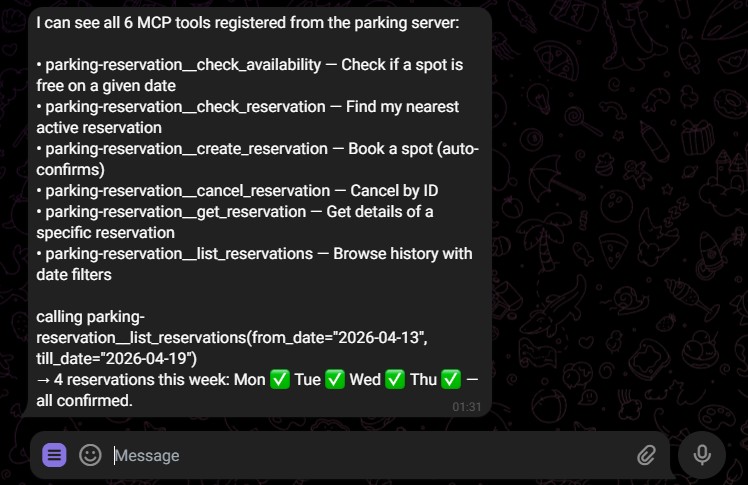
Result: All 6 tools appear natively — parking__check_availability,
parking__create_reservation, parking__cancel_reservation, etc. — with full
JSON Schema descriptions, parameter validation, and error handling. The AI assistant
calls them directly, no exec scripts needed.
Then just ask: “Reserve parking for tomorrow” or “Is my spot free on Friday?”
Lessons Learned
The MCP protocol is straightforward. The hard part was understanding the parking API we were wrapping. These are the gotchas that cost us time.
1. API Can Return null (Valid JSON)
Our API returns HTTP 200 with body null when there’s no reservation. resp.json()
returns Python None, which our code initially treated as “non-JSON response”. The bug
was a try/except around resp.json() that caught None and converted it to “parse
error”.
Fix: let resp.json() handle null naturally — it returns None correctly. The bug was
in our wrapper.
2. “Optional” Parameters Aren’t Always Optional
The API docs listed user as optional. In reality, omitting it returned HTTP 403
Forbidden. We extract the user ID from the JWT token’s sub claim and always send it:
def _get_user_id(token):
    data = _decode_jwt(token)
    return data.get("sub") if data else None
3. Filter Parameters Have Unexpected Semantics
The API accepted dimension=created vs dimension=start. Both returned valid data, but
created filtered by when the reservation was made (not when the spot is reserved for).
We showed a colleague “this week’s reservations” and saw different results than the portal.
Fix: use dimension=start.
4. Timezone Bugs Are Subtle
Hardcoded offset for a fixed timezone works in winter but breaks in summer due to DST.
Use ZoneInfo:
from zoneinfo import ZoneInfo
LOCAL_TZ = ZoneInfo("Europe/Berlin")
datetime.now(LOCAL_TZ)  # Always correct, handles DST automatically
5. Input Validation Matters
Regex ^\d{4}-\d{2}-\d{2}$ accepts 2026-99-99. Always validate with actual date
parsing. For IDs used in URL paths (/api/v1/bookings/{id}), validate they’re numeric
to prevent path traversal:
def _validate_date(date_str):
    if not re.match(r"^\d{4}-\d{2}-\d{2}$", date_str):
        raise ValueError(f"Invalid date format: '{date_str}'.")
    try:
        datetime.strptime(date_str, "%Y-%m-%d")
    except ValueError:
        raise ValueError(f"Invalid date: '{date_str}'.")

if not re.match(r"^\d+$", rid):
    raise ValueError(f"Invalid booking ID: '{rid}'. Must be numeric.")
6. Response Field Names Aren’t Consistent
Different endpoints returned the same data with different field names: state in one
endpoint, status in another. records in the list endpoint, items in others.
startMillis/endMillis vs start/end.
Always check actual API responses, don’t assume consistency.
7. Tool Annotations Help the AI
readOnlyHint: truefor GET — the AI calls these freelydestructiveHint: truefor cancel — the AI asks for confirmation firstidempotentHint: truefor operations safe to retry
With proper annotations, the AI won’t accidentally cancel a reservation without asking.
Sources and References
| Resource | What it provided |
|---|---|
| MCP Specification | Protocol reference, tool annotations |
| MCP Python SDK | FastMCP framework, ToolError handling |
| Anthropic MCP Builder | Best practices, parameter descriptions |
| OpenCode | MCP-compatible AI tool we use daily |
Final Thoughts
MCP servers are surprisingly simple to build. The Python SDK handles all the protocol complexity — you write Python functions with good descriptions, and any AI tool can use them. The hard part isn’t MCP. It’s understanding the API you’re wrapping, handling its edge cases, and making the error messages useful. Our server has been running for weeks, and “reserve parking for tomorrow” still feels like magic — even though it’s just ~650 lines of Python talking to a web API over HTTPS.
Update — continued in Part 2. This was the easy part. The parking platform later changed: reservations had to appear in the mobile app, the web UI and the app diverged, and the simple REST calls stopped working. In Turn Any Web App Into an AI Agent we hit the walls (an undocumented
blocks[]schema, rotating session cookies, a timezone bug that booked the wrong day), found the bypasses, and turned the whole approach into a recipe you can apply to any app that was never meant to be automated.