Home-Assistant

E-Ink Dashboard: Repurposing an Old Kindle Paperwhite with RPi5

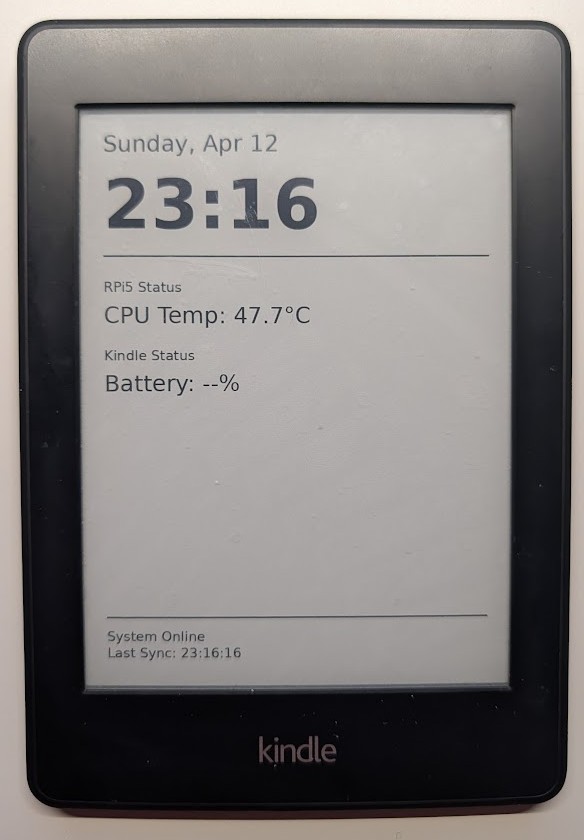
Don’t throw away that old Kindle gathering dust in your drawer. With its high-contrast E-ink display and incredible battery life, it is the perfect candidate for a low-power home dashboard. In this post, I’ll show you how I turned a Kindle Paperwhite 2 into a 2-hour refreshing dashboard powered by a Raspberry Pi 5.


Secure Remote Access: Connecting to Home Assistant on RPi5 via Tailscale

Secure Remote Access: Connecting to Home Assistant on RPi5 via Tailscale

In my previous post, I shared how to install Home Assistant OS (HAOS) inside a KVM on a Raspberry Pi 5. While having a powerful local server is great, it brings up a major question: How do you access it securely from the outside?

For this setup, I wanted to achieve two specific goals:

  1. Enable a free and secure VPN for my mobile device (so I can surf safely on public Wi-Fi).
  2. Gain seamless remote access to Home Assistant without exposing any ports to the internet.

The answer to both is Tailscale.

Home Assistant Entity & Device Naming Best Practice

Proper naming conventions in Home Assistant transform a chaotic smart home into an organized, maintainable system. Without consistent naming, you’ll struggle to find devices, create automations, and troubleshoot issues as your setup grows. Good naming conventions make your smart home scalable and intuitive for everyone in your household.

This guide provides a structured approach to naming that grows with your system, inspired by the Home Assistant Naming Convention repository maintained by the community.

Add Zigbee Dongle to Home Assistant VM (Raspberry Pi 5)

This guide shows how to pass through the SONOFF Zigbee 3.0 USB Dongle Plus to a Home Assistant OS (HAOS) virtual machine running on Raspberry Pi 5 using KVM/libvirt. This allows you to use Zigbee devices directly within your virtualized Home Assistant setup.

Installing Home Assistant OS in KVM on Raspberry Pi 5

Installing Home Assistant OS in KVM on Raspberry Pi 5

Running Home Assistant directly on a Raspberry Pi is the default, but what if you want KVM virtualization on the same Pi 5? Virtualizing HAOS gives you snapshots, easy backup, and the ability to run other services alongside it. This guide walks through the full setup — from installing libvirt and KVM on a Pi 5 to getting Home Assistant accessible on your LAN.

Convert an Nvidia Shield Tablet into a Wall Display: Battery Removal Guide

As a Home Assistant enthusiast, I wanted a dedicated, always-on display to monitor and control my smart home. Repurposing my old Nvidia Shield Tablet seemed like the perfect solution. However, the aging battery was generating unnecessary heat and wasn’t needed for a wall-mounted setup that’s constantly plugged in. In this guide, I’ll walk you through how I removed the battery from my Nvidia Shield Tablet and set it up as a sleek wall-mounted dashboard using the Fully Kiosk Browser app.