Raspberry-Pi

E-Ink Dashboard: Repurposing an Old Kindle Paperwhite with RPi5

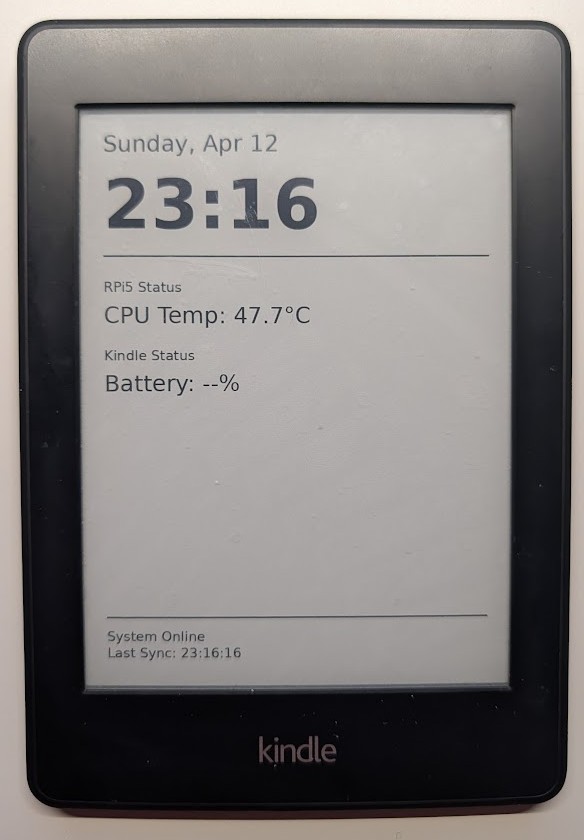
Don’t throw away that old Kindle gathering dust in your drawer. With its high-contrast E-ink display and incredible battery life, it is the perfect candidate for a low-power home dashboard. In this post, I’ll show you how I turned a Kindle Paperwhite 2 into a 2-hour refreshing dashboard powered by a Raspberry Pi 5.


Secure Remote Access: Connecting to Home Assistant on RPi5 via Tailscale

Secure Remote Access: Connecting to Home Assistant on RPi5 via Tailscale

In my previous post, I shared how to install Home Assistant OS (HAOS) inside a KVM on a Raspberry Pi 5. While having a powerful local server is great, it brings up a major question: How do you access it securely from the outside?

For this setup, I wanted to achieve two specific goals:

  1. Enable a free and secure VPN for my mobile device (so I can surf safely on public Wi-Fi).
  2. Gain seamless remote access to Home Assistant without exposing any ports to the internet.

The answer to both is Tailscale.

Testing Debian 12 ARM64 VM on Raspberry Pi 5 KVM: Pitfalls and Solutions

After successfully setting up a Home Assistant OS (HAOS) VM on my Raspberry Pi 5 (KVM/libvirt approach), I wanted to test a minimal Debian 12 ARM64 VM for InfluxDB and Grafana.

My Setup So Far

  • Host: Raspberry Pi 5, 16GB RAM
  • Hypervisor: KVM / QEMU / libvirt
  • Guest: HAOS running smoothly
  • Management: Cockpit & virt-manager

Migrating Pi 5 from microSD to USB3 Samsung 870 EVO SSD, and Pitfalls

Since I use Raspberry Pi 5 as a virtual machine (VM) host for Home Assistant OS (HAOS) in KVM, I want a system that is simple, stable, and reliable.
After repeated microSD drawbacks, I selected the Samsung 870 EVO SSD 500GB via USB3 over my previous Raspberry Pi 128GB microSD U2 for system storage.

Add Zigbee Dongle to Home Assistant VM (Raspberry Pi 5)

This guide shows how to pass through the SONOFF Zigbee 3.0 USB Dongle Plus to a Home Assistant OS (HAOS) virtual machine running on Raspberry Pi 5 using KVM/libvirt. This allows you to use Zigbee devices directly within your virtualized Home Assistant setup.

Installing Home Assistant OS in KVM on Raspberry Pi 5

Installing Home Assistant OS in KVM on Raspberry Pi 5

Running Home Assistant directly on a Raspberry Pi is the default, but what if you want KVM virtualization on the same Pi 5? Virtualizing HAOS gives you snapshots, easy backup, and the ability to run other services alongside it. This guide walks through the full setup — from installing libvirt and KVM on a Pi 5 to getting Home Assistant accessible on your LAN.

WiFi Access Point Bridge with Raspberry Pi 3 – ETH to WLAN

A Raspberry Pi WiFi Extender is a cheap and power efficient way of increasing the total range of your WiFi Network. In my case I needed to extend a WiFi coverage within the same LAN (bridge mode from Ethernet to WiFi).

I have found a working shortcut 😎 to create an access point following a GitHub project so I didn’t need to follow instructions from raspberrypi.org page – Using the Raspberry Pi as an access point to share an internet connection (bridge).